메타 데이터의 끝으로 건너뛰기
메타 데이터의 시작으로 이동
이 페이지의 이전 버전을 보고 있습니다. 현재 버전 보기.
현재와 비교
페이지 이력 보기
« 이전
버전 32
현재 »
Launch Release No. 7.3.500.20250722 / Latest Release No.
※ 주의 : 외부 포탈 다른 창으로 i-AUD보고서 호출 방식의 SSO연동을 적용하기 위해 '1-0.공통 설정' 과정을 선행으로 설정해야 함
− 개요
> 외부 포탈에서 인증 토큰을 발급 받은 후에 메인 도메인을 기준으로 쿠키에 설정 후 자유롭게 AUD플랫폼 서버 내 주소 혹은 Rest API 호출
> 메인 도메인이 동일하기 때문에 쿠키가 공유될 수 있는 환경이라 따로 인증 토큰을 싣어 보내지 않아도 무방
(변수 설정 및 세팅은 기존 세팅과 동일)
− 제약 사항
> 기본적으로 AP 토큰이 쿠키에 공유되어 사용되기 때문에 외부 PORTAL (타 사이트 포탈) 과 AUD7 플랫폼 PORTAL의 Domain name이 동일해야 된다.
> 외부 POTAL에서는 발급된 AP 인증 토큰이 정상적으로 브라우저 Cookie에 bimatrix_ap_accessToken으로 설정되어 있는지 확인이 필요하다.
1. 샘플 코드(sitePortalAUD7EmSample.jsp) 설정
1-1) 인증 정보 설정
1-1-1) audSecretKey, audApId 설정
> SSH Key정보를 sitePortalAUD7EmSample.jsp에 설정
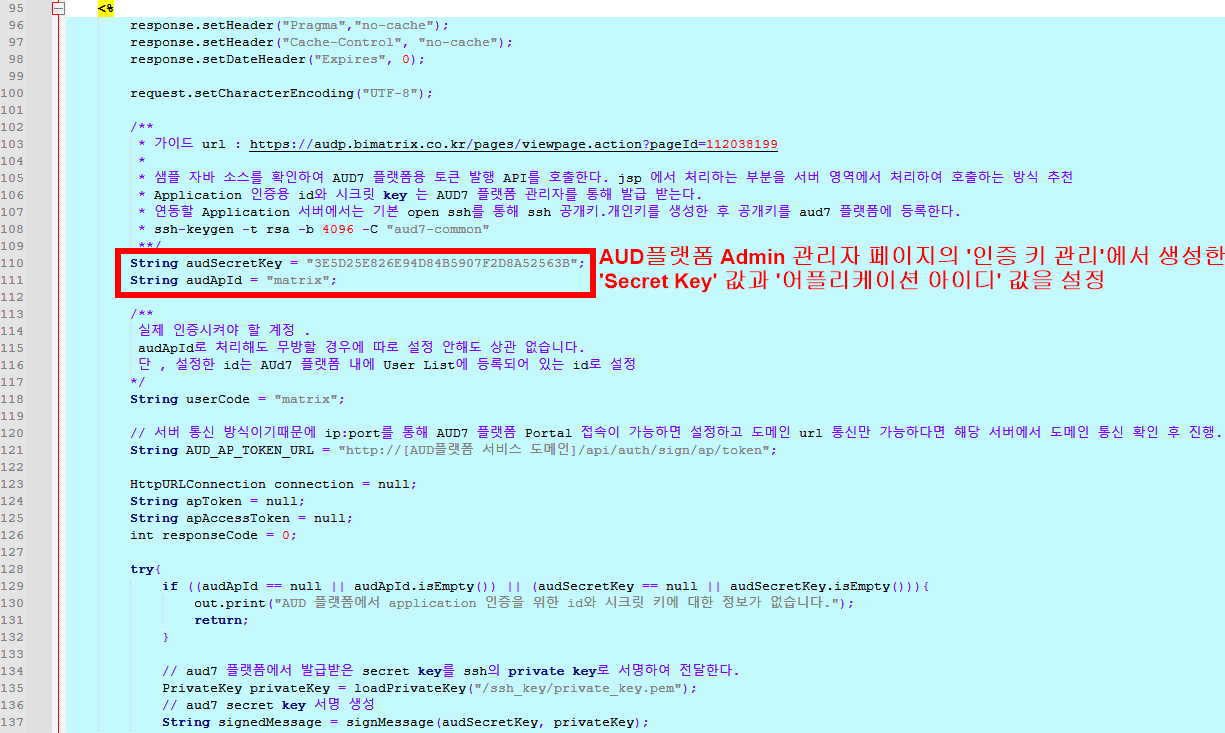
< 그림 3-1. 샘플 코드 인증 정보 설정 캡처 1 >
1-1-2) privateKey 설정 - 고객사 포탈 서버에 private_key.pem을 저장하고 경로를 지정
> loadPrivateKey 메서드 매개변수에 '인증 키 관리' 페이지에서 등록이 완료되면 발급되는 private_key.pem 파일의 위치를 설정
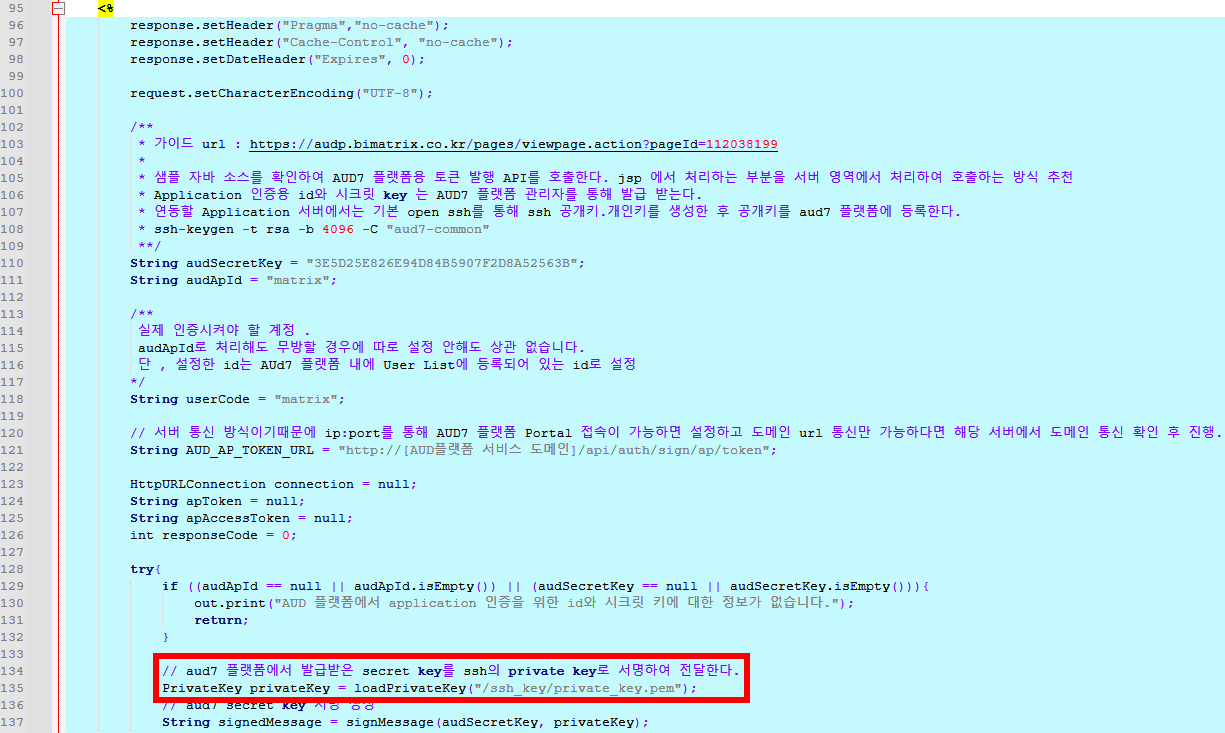
< 그림 3-2. 샘플 코드 인증 정보 설정 캡처 2 >
1-2) 인증 대상 유저 코드 설정
1-2-1) userCode 설정
> 실제 사이트에서 인증 시켜야 할 계정 값을 설정
(※ 주의 : 아래 샘플 코드엔 matrix로 고정된 값으로 구현했지만, 실제 구현 시 userCode는 유동적으로 변경하여 인증 과정을 실행해야 함)
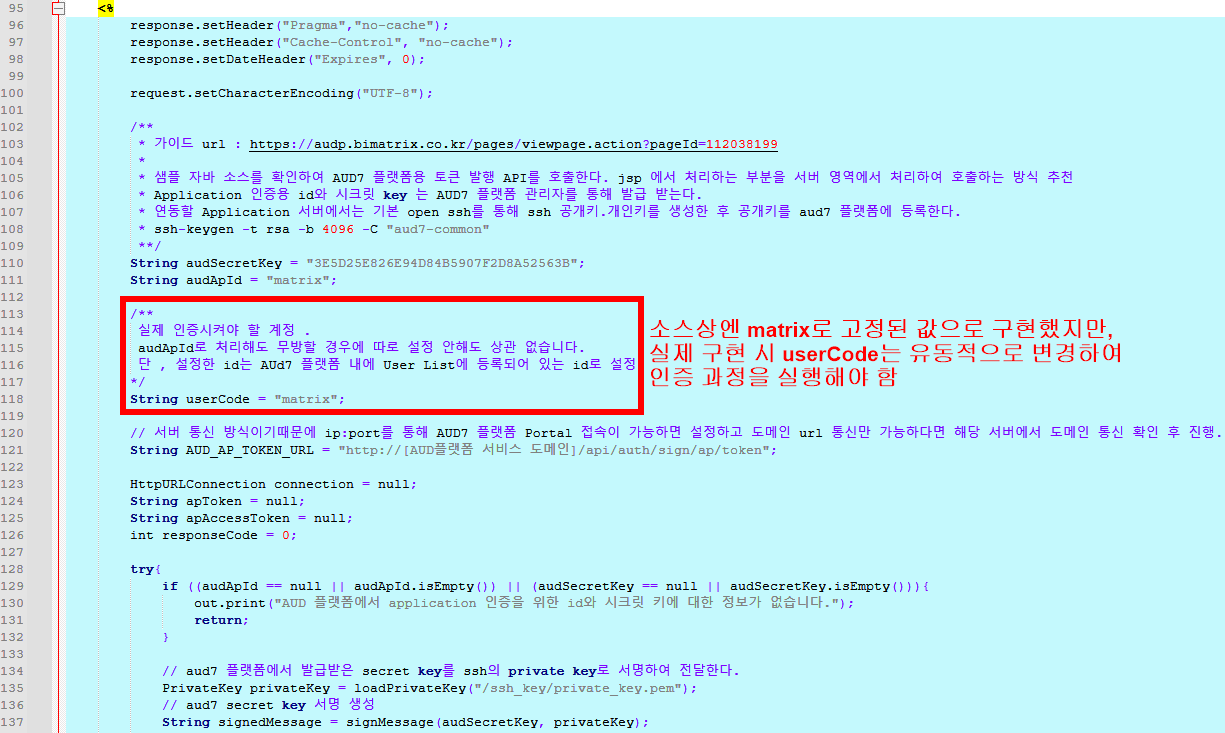
< 그림 3-3. 샘플 코드 인증 정보 설정 캡처 3 >
1-3) 토큰 요청 URL 및 도메인 설정
1-3-1) AUD_AP_TOKEN_URL 설정
> AUD플랫폼 경로 설정 (Ex. "http(s)://[IP:PORT]/api/auth/sign/ap/token")
(※ 주의 : 서버 통신 방식이기 때문에 IP:PORT를 통해 AUD플랫폼 Portal접속이 가능하면 설정하고, 도메인 URL통신만 가능하다면 해당 서버에서 도메인 통신 확인 후 진행)
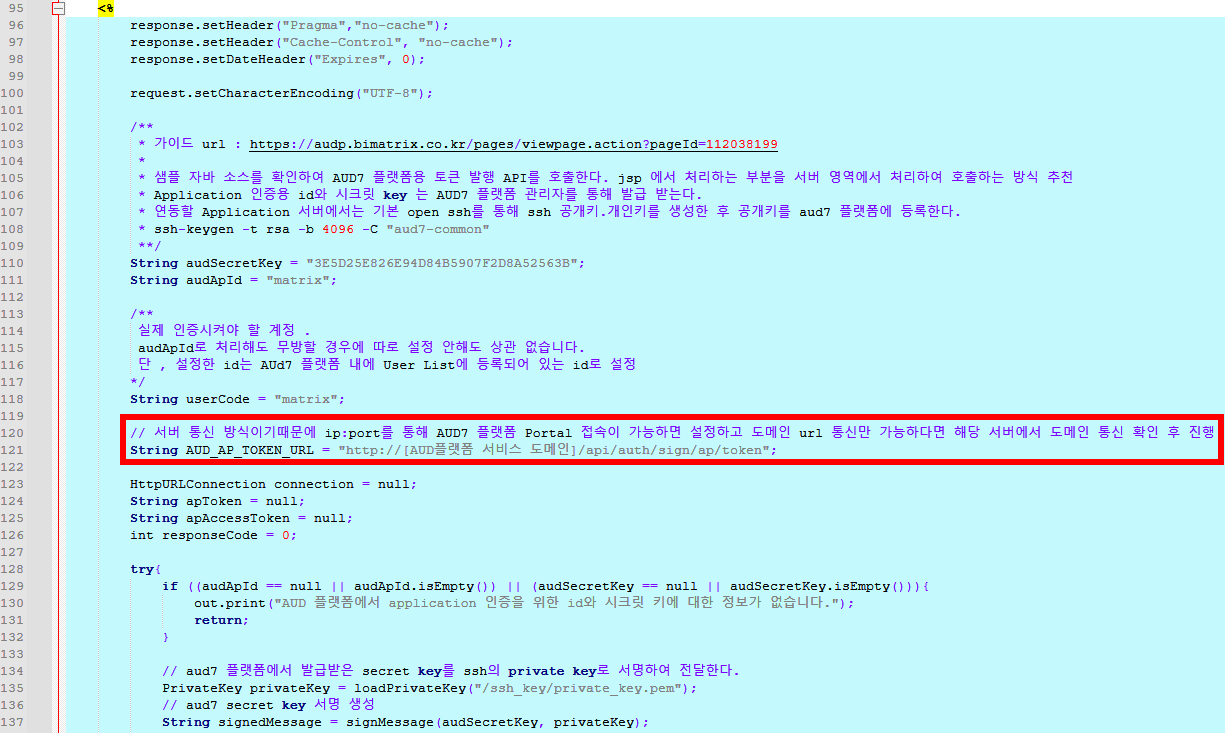
< 그림 3-4. 샘플 코드 인증 정보 설정 캡처 4 >
2. 외부 포탈에서 다른 창으로 i-AUD보고서 호출 방법
> openPopReport 함수를 사용하여 portal/Content.jsp를 window.open()을 사용하여 팝업 화면으로 연다.
> openPopReport 함수 호출 시 매개변수로 reportCode값을 넘기면 코드 값에 해당하는 i-AUD보고서가 팝업 형태로 열린다.

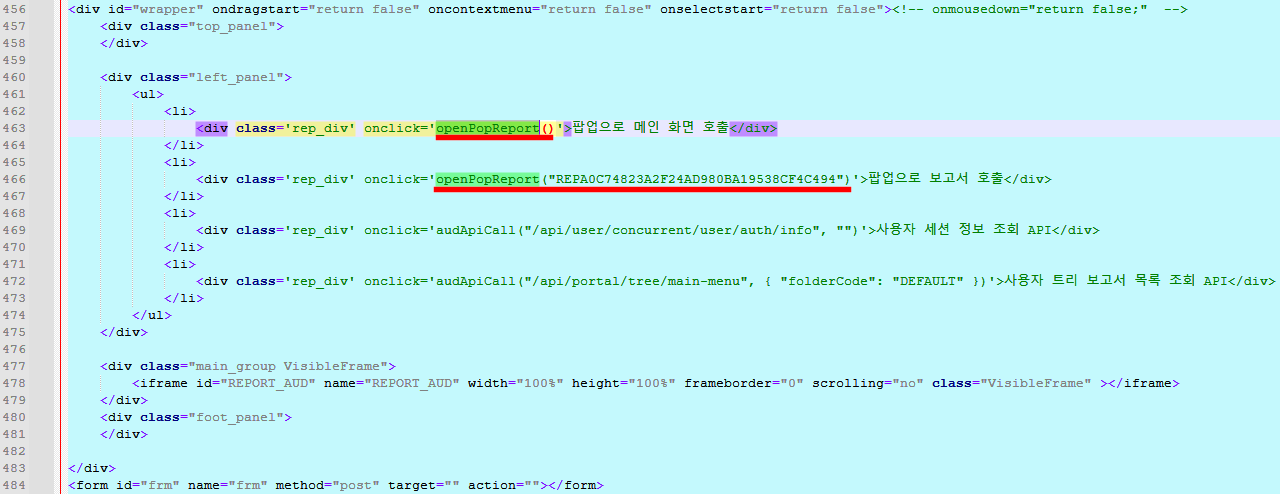
< 그림 3-4. 샘플 코드 보고서 호출부 캡처 >
<%@ page language="java" contentType="text/html; charset=UTF-8" pageEncoding="UTF-8"%>
<%@ page import="java.io.IOException"%>
<%@ page import="java.net.HttpURLConnection"%>
<%@ page import="java.net.MalformedURLException"%>
<%@ page import="java.net.URL"%>
<%@ page import="java.nio.file.Files"%>
<%@ page import="java.nio.file.Paths"%>
<%@ page import="java.security.KeyFactory"%>
<%@ page import="java.security.PrivateKey"%>
<%@ page import="java.security.Signature" %>
<%@ page import="java.security.spec.PKCS8EncodedKeySpec" %>
<%@ page import="java.util.Base64" %>
<%@ page import="java.util.Enumeration" %>
<%@ page import="java.util.HashMap" %>
<%@ page import="java.util.Map" %>
<!DOCTYPE html>
<html>
<head>
	<meta name="viewport" content="width=device-width, user-scalable=no">
	<meta http-equiv="Content-Type" content="text/html; charset=utf-8"/>
	<meta http-equiv="X-UA-Compatible" content="IE=edge">
	<meta http-equiv="Cache-Control" content="no-cache, no-store, must-revalidate">
	<meta http-equiv="Pragma" content="no-cache">
	<meta http-equiv="Expires" content="0">

	<style>
		* {
			margin: 0;
		}

		.top_panel {
			position: absolute;
			width: 100%;
			height: 50px;
			background-color: black;
		}

		.left_panel {
			position: absolute;
			width: 250px;
			background-color: darkgrey;
		}

		.foot_panel {
			position: absolute;
			bottom: 0; /* 화면의 맨 아래에 위치 */
			left: 0; /* 왼쪽 끝에서 시작 */
			width: 100%;
			height: 10px;
			background-color: pink;
		}

		.HideFrame {
			left: -50000px;
			top: -50000px;
			position: absolute;
		}

		.VisibleFrame {
			float: left;
			position: relative;
			overflow: hidden;
			left: 0px;
			top: 0px;
			width: 100%;
			height: 100%;
		}
	</style>
	<%!
		// 개인 키 로딩
		private static PrivateKey loadPrivateKey(String path) throws Exception {
			// 개인 키 로딩 로직을 구현 (파일 파싱 또는 다른 방법으로)
			System.out.println("Private Key path: " + path);
			String keyPEM = new String(Files.readAllBytes(Paths.get(path)))
                .replaceAll("-----BEGIN PRIVATE KEY-----", "")
                .replaceAll("-----END PRIVATE KEY-----", "")
                .replaceAll("\\s", "");  // 모든 공백 제거

			byte[] keyBytes = Base64.getDecoder().decode(keyPEM);
			PKCS8EncodedKeySpec keySpec = new PKCS8EncodedKeySpec(keyBytes);
			KeyFactory keyFactory = KeyFactory.getInstance("RSA");
			return keyFactory.generatePrivate(keySpec);
		}

		// 메시지 서명
		private static String signMessage(String message, PrivateKey privateKey) throws Exception {
			Signature signature = Signature.getInstance("SHA256withRSA");
			signature.initSign(privateKey);
			signature.update(message.getBytes());

			byte[] signedBytes = signature.sign();
			return Base64.getEncoder().encodeToString(signedBytes);
		}
	%>
	<%
		response.setHeader("Pragma","no-cache");
		response.setHeader("Cache-Control", "no-cache");
		response.setDateHeader("Expires", 0);

		request.setCharacterEncoding("UTF-8");

		/**
		 * 가이드 url : https://audp.bimatrix.co.kr/pages/viewpage.action?pageId=112038199
		 *
		 * 샘플 자바 소스를 확인하여 AUD7 플랫폼용 토큰 발행 API를 호출한다. jsp 에서 처리하는 부분을 서버 영역에서 처리하여 호출하는 방식 추천
		 * Application 인증용 id와 시크릿 key 는 AUD7 플랫폼 관리자를 통해 발급 받는다.
		 * 연동할 Application 서버에서는 기본 open ssh를 통해 ssh 공개키.개인키를 생성한 후 공개키를 aud7 플랫폼에 등록한다.
		 * ssh-keygen -t rsa -b 4096 -C "aud7-common"
		 **/
		String audSecretKey = "3E5D25E826E94D84B5907F2D8A52563B";
		String audApId = "matrix";

		/**
		 실제 인증시켜야 할 계정 .
		 audApId로 처리해도 무방할 경우에 따로 설정 안해도 상관 없습니다.
		 단 , 설정한 id는 AUd7 플랫폼 내에 User List에 등록되어 있는 id로 설정
		*/
		String userCode = "matrix";

		// 서버 통신 방식이기때문에 ip:port를 통해 AUD7 플랫폼 Portal 접속이 가능하면 설정하고 도메인 url 통신만 가능하다면 해당 서버에서 도메인 통신 확인 후 진행.
		String AUD_AP_TOKEN_URL = "http://[AUD플랫폼 서비스 도메인]/api/auth/sign/ap/token";

		HttpURLConnection connection = null;
		String apToken = null;
		String apAccessToken = null;
		int responseCode = 0;

		try{
			if ((audApId == null || audApId.isEmpty()) || (audSecretKey == null || audSecretKey.isEmpty())){
				out.print("AUD 플랫폼에서 application 인증을 위한 id와 시크릿 키에 대한 정보가 없습니다.");
				return;
			}

			// aud7 플랫폼에서 발급받은 secret key를 ssh의 private key로 서명하여 전달한다.
			PrivateKey privateKey = loadPrivateKey("/ssh_key/private_key.pem");
			// aud7 secret key 서명 생성
			String signedMessage = signMessage(audSecretKey, privateKey);

			// header 설정은 아래처럼 해주세요.
			Map<String, String> requestHeaders = new HashMap();
			requestHeaders.put("X-AUD-AP-Id", audApId);
			requestHeaders.put("X-AUD-AP-Secret-SSH", signedMessage);
			if (userCode != null || !userCode.isEmpty())
				requestHeaders.put("X-AUD-USER" , userCode);

			try{
				// URL 객체 생성
				URL url = new URL(AUD_AP_TOKEN_URL);
				connection = (HttpURLConnection) url.openConnection();
			}catch(MalformedURLException e){
				out.print("AUD 플랫폼 주소가 잘못되었습니다.");
				return;
			}catch(IOException e){
				out.print("연결이 실패했습니다 [api url:"+ AUD_AP_TOKEN_URL +"]");
				return;
			}

			// HTTP 메서드 설정
			connection.setRequestMethod("POST");
			for(Map.Entry<String, String> header :requestHeaders.entrySet()) {
				connection.setRequestProperty(header.getKey(), header.getValue());
			}
			// 응답 코드 확인
			responseCode = connection.getResponseCode();

			if (responseCode == HttpURLConnection.HTTP_OK){
				apAccessToken = connection.getHeaderField("bimatrix_ap_accessToken");
				if (apAccessToken == null){
					out.println("ap token이 정상적으로 발급되지 않았습니다");
					out.println(responseCode);
					out.println(HttpURLConnection.HTTP_OK);
					return;
				}
				else{
					apToken = apAccessToken;
				}
			}else if (responseCode == HttpURLConnection.HTTP_UNAUTHORIZED){
				out.print("만료된 ap token 입니다.");
				return ;
			}

		}catch(Exception e){
			e.printStackTrace();
		}finally {
			if (connection != null) {
				connection.disconnect();
			}
		}

		Map<String, String> data = new HashMap();
		Enumeration<?> paramNames = request.getParameterNames();

		while(paramNames.hasMoreElements()) {
			String key = (String) paramNames.nextElement();
			if(key.toUpperCase().indexOf("VS_")==0 || key.toUpperCase().indexOf("VN_")==0 || key.toUpperCase().indexOf("V_")==0) {
				String value = request.getParameter(key);
				data.put(key , value);
			}
		}

		StringBuilder json = new StringBuilder();
		json.append("{");
		for (Map.Entry<String, String> entry : data.entrySet()) {
			json.append("\"").append(entry.getKey()).append("\": \"")
					.append(entry.getValue()).append("\", ");
		}

		// 마지막 쉼표 제거
		if (data.size() > 0)
			json.setLength(json.length() - 2);

		json.append("}");

	%>
	<script type="text/javascript" src="./jquery-3.6.0.min.js"></script>
	<!-- aud7 embedded setting jsp file path -->
	<script type="text/javascript">
	</script>

</head>
<body>
<script>
	var biServerUrl = "http://a.bimatrix.com:8087/matrix";

	var apAccessToken = '<%=apAccessToken%>';
	var responseCode = '<%=responseCode%>';

	window.onload = function() {
		console.log("onload");
		// 맨 처음 로딩 시 또는 외부 포탈 로그인 시에 발급받은 AUD 플랫폼 AP token을 쿠키에 설정 또는 전역 변수로 가지고 있어 매번 url 호출 시 전달
		setCookie('bimatrix_ap_accessToken', '<%=apToken%>', 1);
	}

	var setCookie = function (cookie_name, value, days) {
		deleteCookie(cookie_name);

		var exdate = new Date();
		exdate.setDate(exdate.getDate() + days);
		// 설정 일수만큼 현재시간에 만료값으로 지정
		// var cookie_value = escape(value) + ((days == null) ? '' : '; expires=' + exdate.toUTCString() + ';path=/;domain='+shareDomain);
		var cookie_value = escape(value) + ((days == null) ? '' : '; expires=' + exdate.toUTCString() + ';path=/;');
		document.cookie = cookie_name + '=' + cookie_value;
	}

	function deleteCookie(name) {
		// document.cookie = name + '=; expires=Thu, 01 Jan 1970 00:00:01 GMT;path=/;domain='+shareDomain;
		document.cookie = name + '=; expires=Thu, 01 Jan 1970 00:00:01 GMT;path=/;';
	}

	function gfnGetCookie(key) {
		const cookies = document.cookie.split(';');
		for (let cookie of cookies) {
			cookie = cookie.trim();

			// 쿠키 이름이 일치하는지 확인
			if (cookie.startsWith(key + '=')) {
				return cookie.substring((key + '=').length);
			}
		}

		return null;
	}


	// ================================================================================================

	function openPopReport(reportCode){
		var winWidth = $( window ).width() - 100;
		var winHeight = $( window ).height() - 100 ;

		if (reportCode) {
        window.open(biServerUrl + "/portal/popupView.jsp?id=" + reportCode, "reportPop", "width=" + winWidth + ",height=" + winHeight + ",resizable=yes");
    	} else {
        window.open(biServerUrl + "/portal/Content.jsp", "reportPop", "width=" + winWidth + ",height=" + winHeight + ",resizable=yes");
    	}
	}

</script>
<div id="wrapper" ondragstart="return false" oncontextmenu="return false" onselectstart="return false"><!-- onmousedown="return false;"  -->
	<div class="top_panel">
	</div>

	<div class="left_panel">
		<ul>
			<li>
				<div class='rep_div' onclick='openPopReport()'>팝업으로 메인 화면 호출</div>
			</li>
			<li>
				<div class='rep_div' onclick='openPopReport("REPA0C74823A2F24AD980BA19538CF4C494")'>팝업으로 보고서 호출</div>
			</li>
		</ul>
	</div>

	<div class="main_group VisibleFrame">
	</div>
	<div class="foot_panel">
	</div>

</div>
<form id="frm" name="frm" method="post" target="" action=""></form>

</body>
</html>