※ 주의 : 기타 외부 시스템 인증 방식의 SSO연동을 적용하기 위해 '2-0.공통 설정' 과정을 선행으로 설정해야 함
1. 기타 외부 시스템 인증
− 개요
> 이 가이드를 통해 자체 인증 방식에 대한 로직을 SpCustomEndPoint.java에 자유롭게 구현하고, 그 성공 또는 실패 결과 만을 AUD플랫폼 시스템에 전달하여 후속 처리를 위임할 수 있습니다.
− API 명세
> Endpoint URL: [AUD플랫폼 서비스 도메인]/api/auth/ap/sso/endpoint
> HTTP Method: GET, POST (둘 다 지원)
> Content-Type: application/x-www-form-urlencoded
− 처리 흐름
> /api/auth/ap/sso/endpoint 호출 -> SpCustomEndPoint.java의 responseParsing에서 httpServletRequest로 받아서 처리
− 적용 방법
1) 파일 준비 및 사전 작업
1-1) sso_error.jsp 추가
> 경로 : [Context Root]/extention/sso/sso_error.jsp 혹은 [자동 설치 본 설치 위치]/matrix/extention/sso/sso_error.jsp
> 작업 내용 : 위 경로에 아래 첨부한 zip파일 내 /extention/sso/sso_error.jsp 파일 위치

1-2) SpCustomEndPoint.java 추가
> 경로 : [Context Root]/WEB-INF/classes/com/matrix/outer/sso/SpCustomEndPoint.java 혹은 [자동 설치 본 설치 위치]/matrix/WEB-INF/classes/com/matrix/outer/sso/SpCustomEndPoint.java
> 작업 내용: 위 경로에 아래 첨부한 zip파일 내 /WEB-INF/classes/com/matrix/outer/sso경로의 파일을 이동 및 로직 작성

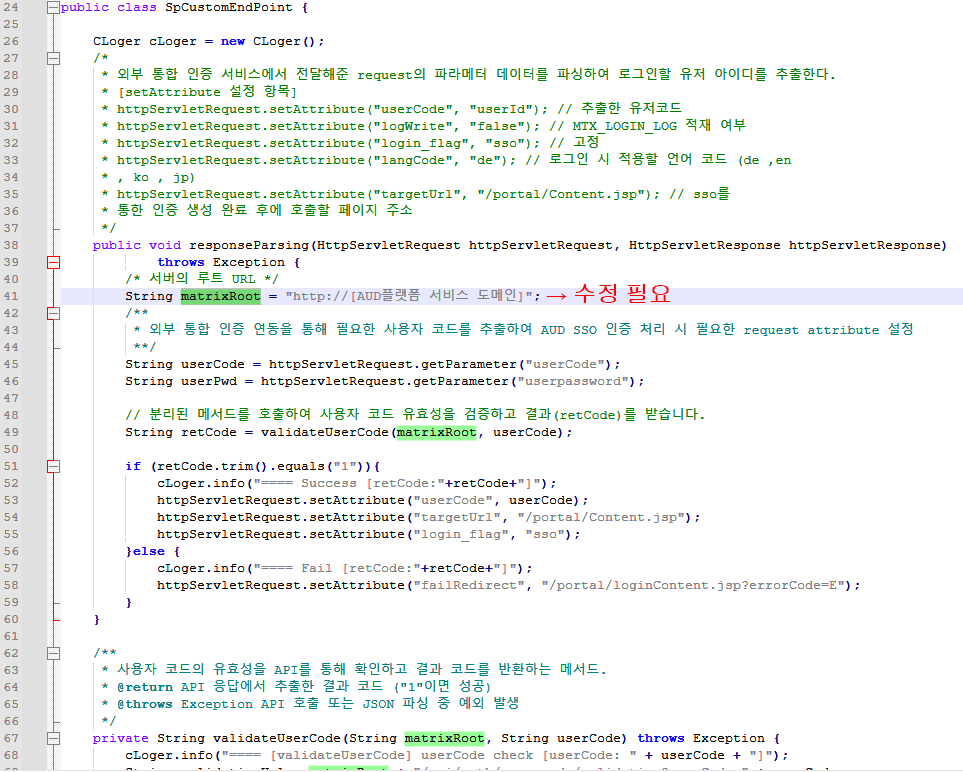
> SpCustomEndPoint.java 수정 (예시)
1-3) Compile.sh or Compile.bat 컴파일 스크립트 수정 및 실행
> 경로 : [Context Root]/WEB-INF/classes/com/matrix/outer/sso/Compile.* 혹은 [자동 설치 본 설치 위치]/matrix/WEB-INF/classes/com/matrix/outer/sso/Compile.*
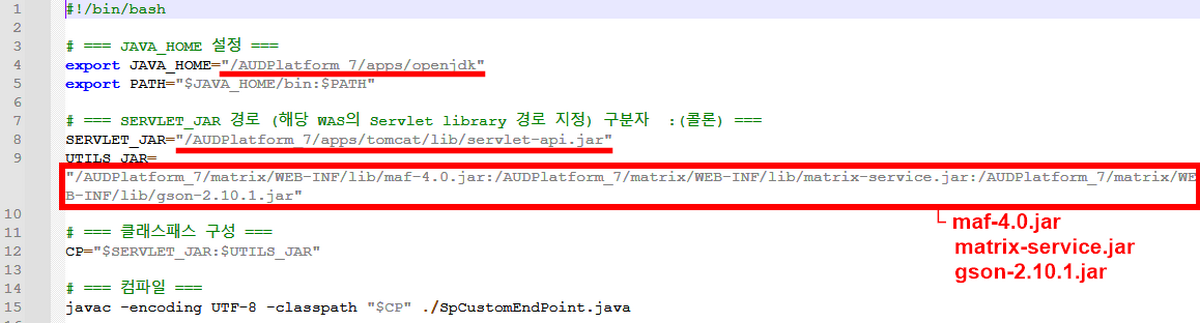
> 작업 내용 : 스크립트의 내용을 사이트의 환경에 맞도록 설정 후 해당 스크립트를 사용하여 SpCustomEndPoint.java를 컴파일
(※ 주의 : 컴파일 후 변경사항 적용 시 WAS 재기동)

> Compile.bat 수정 (예시 - 자동 설치 본을 기준으로 하여 작성)

> Compile.sh 수정 (예시 - 자동 설치 본을 기준으로 하여 작성)
2) SpCustomEndPoint.java 사용가이드
> SSO 연동에 필요한 파라미터를 자유롭게 정의하고 API 호출 시 전달합니다.
> 호출된 커스텀 로직 내에서 전달받은 파라미터를 사용하여 자체 인증 비즈니스 로직을 수행합니다.
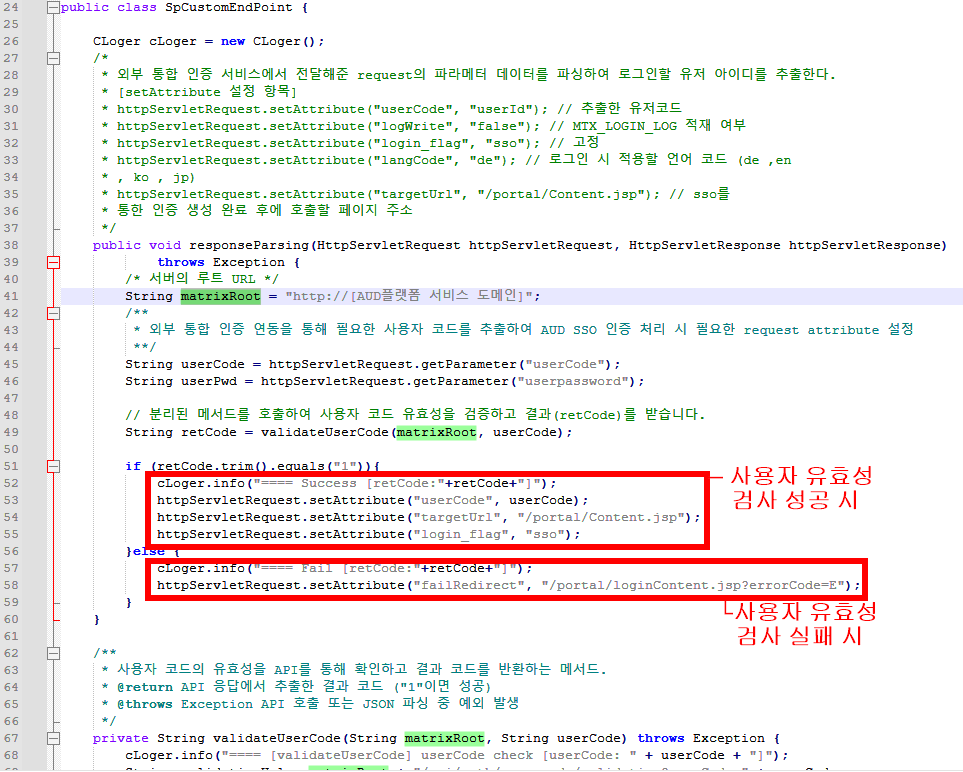
> 인증 결과(성공 또는 실패)에 따라 HttpServletRequest 객체에 속성(Attribute)을 설정하여 반환합니다.
> Attribute 중 'targetUrl'과 'errorPageUrl'은 고객사에 맞춰 수정합니다.
> Attribute 중 login_flag의 속성 값에 따라 로그인 후 동작과 세션 처리 방식이 달라집니다.
'sso' - 세션이 유지되어 일반적인 로그아웃이 동작하지 않습니다. 완전한 SSO 환경에 사용합니다.
'main' - 일반적인 로그인과 동일하게 세션을 처리하여 로그아웃이 가능합니다.
'adm' - 관리자 페이지로 진입할 때 사용하며, targetUrl을 /iMgt/main.jsp로 설정해야 합니다.
3) 디버깅 방법
> cLoger클래스의 info 메서드 사용하여 로그 기록 시 해당 내용을 matrix.properties의 matrix.logerpath에서 지정한 로그 경로의 Matrix.log에서 확인 할 수 있습니다.
> 경로 : [Context Root]/WEB-INF/classes/matrix/logs/logs/Matrix.log 혹은 [자동 설치 본 설치 위치]/logs/matrix/logs/Matrix.log
> 사용 방법

package com.matrix.outer.sso;

import com.google.gson.JsonObject;
import com.google.gson.JsonParser;
import com.matrix.common.CLoger;
import com.matrix.common.XMatrix;
import com.matrix.framework.common.util.MatrixUtil;

import javax.net.ssl.HttpsURLConnection;
import javax.net.ssl.SSLContext;
import javax.net.ssl.TrustManager;
import javax.net.ssl.X509TrustManager;
import javax.servlet.http.HttpServletRequest;
import javax.servlet.http.HttpServletResponse;
import java.io.BufferedReader;
import java.io.File;
import java.io.InputStreamReader;
import java.io.OutputStream;
import java.net.HttpURLConnection;
import java.net.URL;
import java.security.cert.CertificateException;
import java.security.cert.X509Certificate;

public class SpCustomEndPoint {

    CLoger cLoger = new CLoger();
    /*
     * 외부 통합 인증 서비스에서 전달해준 request의 파라메터 데이터를 파싱하여 로그인할 유저 아이디를 추출한다.
     * [setAttribute 설정 항목]
     * httpServletRequest.setAttribute("userCode", "userId"); // 추출한 유저코드
     * httpServletRequest.setAttribute("logWrite", "false"); // MTX_LOGIN_LOG 적재 여부
     * httpServletRequest.setAttribute("login_flag", "sso"); // 고정
     * httpServletRequest.setAttribute("langCode", "de"); // 로그인 시 적용할 언어 코드 (de ,en
     * , ko , jp)
     * httpServletRequest.setAttribute("targetUrl", "/portal/Content.jsp"); // sso를
     * 통한 인증 생성 완료 후에 호출할 페이지 주소
     */
    public void responseParsing(HttpServletRequest httpServletRequest, HttpServletResponse httpServletResponse)
            throws Exception {
        /* 서버의 루트 URL */
        String matrixRoot = "http://[AUD플랫폼 서비스 도메인]";
        /**
         * 외부 통합 인증 연동을 통해 필요한 사용자 코드를 추출하여 AUD SSO 인증 처리 시 필요한 request attribute 설정
         **/
        String userCode = httpServletRequest.getParameter("userCode");
        String userPwd = httpServletRequest.getParameter("userpassword");

        // 분리된 메서드를 호출하여 사용자 코드 유효성을 검증하고 결과(retCode)를 받습니다.
        String retCode = validateUserCode(matrixRoot, userCode);

        if (retCode.trim().equals("1")){
            cLoger.info("==== Success [retCode:"+retCode+"]");
            httpServletRequest.setAttribute("userCode", userCode);
            httpServletRequest.setAttribute("targetUrl", "/portal/Content.jsp");
            httpServletRequest.setAttribute("login_flag", "sso");
        }else {
            cLoger.info("==== Fail [retCode:"+retCode+"]");
            httpServletRequest.setAttribute("failRedirect", "/portal/loginContent.jsp?errorCode=E");
        }
    }

    /**
     * 사용자 코드의 유효성을 API를 통해 확인하고 결과 코드를 반환하는 메서드.
     * @return API 응답에서 추출한 결과 코드 ("1"이면 성공)
     * @throws Exception API 호출 또는 JSON 파싱 중 예외 발생
     */
    private String validateUserCode(String matrixRoot, String userCode) throws Exception {
        cLoger.info("==== [validateUserCode] userCode check [userCode: " + userCode + "]");
        String validationUrl = matrixRoot + "/api/auth/user-code/validation?userCode=" + userCode;
        String userChkResponse = execute(validationUrl, "");
        cLoger.info("==== [validateUserCode] userCode check value:" + userChkResponse);

        JsonParser jsonParser = new JsonParser();
        JsonObject jsonObject = jsonParser.parse(userChkResponse).getAsJsonObject();
        JsonObject resultJson = jsonObject.get("result").getAsJsonArray().get(0).getAsJsonObject();
        String retCode = resultJson.get("value").getAsString();
        return retCode;
    }

    private String execute(String targetURL, String data) throws  Exception{
        CLoger cLoger = new CLoger();
        HttpURLConnection con = null;
        BufferedReader bufferReader = null;
        OutputStream outStream = null;
        try{
            URL url = null ;
            try{
                url = new URL(null,targetURL);
            }catch(ClassCastException classCastException){
                cLoger.error(classCastException);
            }

            boolean isSecure = targetURL.toLowerCase().startsWith("https:");
            if(isSecure){
                // https 연결
                con = (HttpsURLConnection)url.openConnection();
                SSLContext sslContext = getSslContext();
                if(sslContext != null){
                    ((HttpsURLConnection)con).setSSLSocketFactory(sslContext.getSocketFactory());
                }
            }else{
                con = (HttpURLConnection)url.openConnection();
            }

            con.setConnectTimeout(10 * 1000);
            con.setReadTimeout(10 * 1000);
            con.setRequestMethod("POST");
            con.setRequestProperty("Accept-Charset", "UTF-8");


            con.setDoInput(true);// 응답 헤더와 메시지를 읽어들이겠다는 옵션
            con.setUseCaches(false);
            con.setDefaultUseCaches(false);

            con.setDoOutput(true); //OutputStream으로 POST 데이터를 넘겨주겠다는 옵션
            outStream = con.getOutputStream();

            outStream.write(data.getBytes("UTF-8"));
            outStream.flush();
            outStream.close();
            outStream = null;

            //응답 결과
            if(con.getResponseCode() != 200 && con.getResponseCode() != 201){
                throw new  java.lang.Exception("HTTP Error("+con.getResponseCode() +")" + targetURL);
            }

            if(con.getContentType() != null && con.getContentType().toUpperCase().indexOf("EUC-KR") != -1){
                bufferReader = new BufferedReader( new InputStreamReader( con.getInputStream(), "EUC-KR" ) );
            }
            else{
                bufferReader = new BufferedReader( new InputStreamReader( con.getInputStream(), "UTF-8" ) );
            }

            String inputText = "";
            StringBuilder sbText = new StringBuilder();
            while ((inputText = bufferReader.readLine()) != null) {
                if(sbText.length() > 0)
                    sbText.append(inputText + "\r\n");
                else
                    sbText.append(inputText);
            }
            bufferReader.close();
            bufferReader = null;

            if(con != null){ try{ con.disconnect(); }catch(Exception ex){ } }
            return sbText.toString();


        } catch (Exception e) {
            if(con != null){ try{ con.disconnect(); }catch(Exception ex){ } }
            throw e;
        }
    }

    private SSLContext getSslContext() throws Exception {
        SSLContext sslCTX = null;
        // TrustManager
        TrustManager[] trustManagers = null;
        trustManagers = new TrustManager[]{
                new X509TrustManager() {
                    @Override
                    public void checkClientTrusted(X509Certificate[] x509Certificates, String s) throws CertificateException {
                    }

                    @Override
                    public void checkServerTrusted(X509Certificate[] x509Certificates, String s) throws CertificateException {
                    }

                    @Override
                    public X509Certificate[] getAcceptedIssuers() {
                        //return new X509Certificate[0];
                        return null;
                    }
                }
        };
        // SSL context
        sslCTX = SSLContext.getInstance("TLS");
        sslCTX.init(null, trustManagers, new java.security.SecureRandom());
        return sslCTX;
    }
}
@echo off
set "JAVA_HOME=C:\AUDPlatform_7\apps\openjdk"
set "PATH=%JAVA_HOME%\bin;%PATH%"

REM === 여러 JAR 파일 설정  구분자 ;(세미콜론)===
set SERVLET_JAR=C:\AUDPlatform_7\apps\tomcat\lib\servlet-api.jar
set UTILS_JAR=C:\AUDPlatform_7\matrix\WEB-INF\lib\maf-4.0.jar;C:\AUDPlatform_7\matrix\WEB-INF\lib\matrix-service.jar;C:\AUDPlatform_7\matrix\WEB-INF\lib\gson-2.10.1.jar

REM === 클래스패스 구성 ===
set CP=%SERVLET_JAR%;%UTILS_JAR%

REM === 컴파일 ===
javac -encoding UTF-8 -classpath "%CP%" .\SpCustomEndPoint.java
#!/bin/bash

# === JAVA_HOME 설정 ===
export JAVA_HOME="/AUDPlatform_7/apps/openjdk"
export PATH="$JAVA_HOME/bin:$PATH"

# === SERVLET_JAR 경로 (해당 WAS의 Servlet library 경로 지정) 구분자  :(콜론) ===
SERVLET_JAR="/AUDPlatform_7/apps/tomcat/lib/servlet-api.jar"
UTILS_JAR="/AUDPlatform_7/matrix/WEB-INF/lib/maf-4.0.jar:/AUDPlatform_7/matrix/WEB-INF/lib/matrix-service.jar:/AUDPlatform_7/matrix/WEB-INF/lib/gson-2.10.1.jar"

# === 클래스패스 구성 ===
CP="$SERVLET_JAR:$UTILS_JAR"

# === 컴파일 ===
javac -encoding UTF-8 -classpath "$CP" ./SpCustomEndPoint.java