page no.
| Showpageid |
|---|
※ (2026.01.29) Sample 첨부 파일 업데이트
- 샘플 수정하여 https 환경에서 연결 가능 합니다.
- 파일명: 외부형상관리연계_API 호출 sh 파일.zip_20251002-11 / 외부형상관리연계_형상 관리 설정_SAMPLE.json_20251002-11
※ (2025.09.24) Sample 첨부 파일 업데이트 (Release No. 7.0.500.20251002-11 부터)
- 보고서에서 사용한 UserComponent 도 형상 관리 대상에 포함됩니다.
- Application Token 발급 시, 인증 키(SSH Key) 생성 방식을 사용합니다.
- 파일명: 외부형상관리연계_API 호출 sh 파일.zip_20250924 / 외부형상관리연계_형상 관리 설정_SAMPLE.json_20250924
기능 설명
Admin 보고서 백업/복원 UI로 제공하던 형상 관리 기능을 Rest API로 제공하여 고객사의 형상관리 시스템에 연계하여 사용할 수 있습니다. (현재는 보고서 단 건을 기준으로 동작합니다.)
외부에서 AUD Platform API를 호출하기 때문에 Application Access Token 연동이 되어 있어야 합니다. (참고: Application Access Token 인증 오픈API 연동 가이드 )
API 호출 이력에 대한 내용을 DB 테이블에 저장합니다.
api 설정 API 호출 관련 필요 파일
- 백업 / 복원 대상 Json 파일 (첨부 파일 확인)
- 백업 / 복원 관련 보고서 파일 및 테이블 정보 : 외부형상관리연계_형상 관리 설정_SAMPLE.json
- 백업 / 복원 설정 파일 (자세한 내용은 3-a 항목 확인)
- {Context Path}/WEB-INF/classes/matrix/matrix_cm.properties 존재하며, API 사용 여부 및 백업 / 복원 파일 경로, Json 파일 경로 설정
※ [5. 백업 및 복원 API 호출 가능한 sh 파일 제공] 관련하여 제공하는 소스 및 첨부 파일은 샘플로서, 필수 사용 파일이 아닙니다.
- 백업 / 복원 대상 Json 파일 (첨부 파일 확인)
API 설정 방법
matrix_cm.properties 옵션 설정 (기본 패키지 포함)
기본 경로: {AUD서버 Context Path}/WEB-INF/classes/matrix/matrix_cm.properties
- matrix.cm.properties.extend 값이 true이면 matrix.cm.properties.extend.path 에 설정한 경로를 바라봅니다.
옵션 정의
속성 키
적용 범위
이름
값 예시
matrix.cm.properties.extend
공통
matrix_cm.properties 파일을 별도 경로에서 사용하는지 여부 (기본 경로 사용: false, 별도 경로 사용: true / 기본 값: false)
false
matrix.cm.properties.extend.path
공통
외부 경로에서 사용하는 경우, 해당 경로 작성
C:/AUDPlatform_7/conf/matrix
sql.fetch.size
공통
SQL fetch size (기본 값: 1000)
1000
matrix.cm.outer
공통
외부 형상관리 사용 여부 (사용: true, 사용하지 않음: false / 기본 값: false)
true
matrix.cm.outer.path
외부 연계용
형상관리 파일 ROOT 경로
C:/AUDPlatform_7/reports/cm/ext
matrix.cm.outer.tableinfo.path
외부 연계용
형상관리 설정 파일 ROOT 경로
C:/AUDPlatform_7/reports/cm/ext/tableinfo
-
형상 관리 설정 파일 패치 (첨부파일첨부 파일)
CM_SAMPLE.json 첨부파일을 첨부 파일을 원하는 경로에 패치한 후, 해당 경로를 matrix_cm.properties > matrix.cm.outer.tableinfo.path에 작성합니다. (파일명 빼고 작성)
해당 파일에 작성된 내용을 기준으로 백업 파일을 생성합니다.
- API 호출 이력 테이블 생성 (첨부파일: Oracle, PostgreSQL 스크립트 → 패키지 배포 시 기본 스크립트에 포함될 예정으로 추후 첨부파일 제거 예정)확인
- 테이블명 : MTX_CM_EXT_LIST
컬럼 정보 및 데이터 예시
Column Name
Description
Type
Length
Null
P.K
default
비고
SEQ
순서
NUMBER
-
N
1
-
-
API_URL
요청 URL
VARCHAR2
500
N
-
-
-
REQUEST_DATE
생성날짜
TIMESTAMP
-
-
-
-
-
REQUEST_PARAM
요청 파라미터
CLOB
-
-
-
-
-
RESULT_STATUS
호출 결과
VARCHAR2
256
-
-
-
-
RESULT_MSG
호출 결과 메시지
VARCHAR2
1000
-
-
-
-
REQUEST_IP
요청 IP 주소
VARCHAR2
100
-
-
-
-
Admin > Repository 테이블 점검 메뉴 > 테이블 점검 실행하여 MTX_CM_EXT_LIST 테이블 존재 확인 > [Repository Script 내려받기] 로 테이블 생성 스크립트 다운로드 받아서 실행합니다.
해당 테이블이 없어도 API는 정상 동작하나, matrix_service.log에 에러 로그가 찍힐 수 있습니다.
- API 호출 방법
요청 URL: {AUD서버 Context Path}/api/cm/backup, restore
API 이름
API URI
METHOD
파라미터
이름
유형
필수 여부
설명
예시
백업
api/cm/backup
POST
reportCode
String
Y
백업할 보고서 코드
{
"reportCode": "REP05B91F3B73F1416096B4D004741C0A08“
, "tableInfoFileName": “CM_SAMPLE.json“
}
tableInfoFileName
String
Y
형상관리 설정 json 파일명
복원
api/cm/restore
POST
restoreFileName
String
Y
복원 대상 파일명(보고서 코드 형태로 호출)
{
"restoreFileName": "REP05B91F3B73F1416096B4D004741C0A08“
, "authRestore": "true“
}
authRestore
String
보고서 권한 복원 여부
(기본 값: false)
-
백업 및 복원 API 호출 가능한 sh 파일 제공 (샘플)
1) 백업 및 복원 API 호출용 Java 파일 및 sh 파일을 샘플로 제공합니다.
2) 실행 과정
- Java 파일 내 필수 설정 정보를 고객사 환경에 맞게 입력하여 저장합니다.
- 각 sh 파일 호출 시 백업 및 복원 API에 맞는 파라미터를 전달합니다. (파라미터는 [4.API 호출 방법]을 참고하시기 바랍니다.)
- 각 sh 파일은 Java 파일 컴파일 후 파라미터를 전달하여 Java 파일을 실행합니다.
- 각 Java 파일은 Application Access Token을 발급하여 백업/복원 API 호출을 수행합니다.
4) 샘플로 제공하는 범위 외 필요한 작업이 있을 경우, 수정하여 사용하시기 바랍니다.(Release No. 7.0.500.20251002-11 부터)
a. 백업 sh 파일호출 예시: ./backup.sh {보고서코드} {형상관리파일명}
backup.sh 파일 수정 → JAVA_HOME 에 Java 경로 설정
코드 블럭 language bash theme Midnight firstline 1 title Sample_backup.sh linenumbers true collapse true #!/bin/sh # 백업 # 해당 서버에 맞게 JAVA 경로 설정 JAVA_HOME="/home/AUDPlatform/apps/openjdk" rm -rf CmBackupApi.class $JAVA_HOME/bin/javac CmBackupApi.java -encoding UTF-8 chmod -R 755 * # 호출 시 파라미터 목록 # 1. 백업할 보고서 코드 (백업 파일이 보고서코드.zip 으로 생성됨) # 2. 형상관리 설정 json 파일명 $JAVA_HOME/bin/java CmBackupApi $1 $2CmBackupApi.java 파일 수정 → AUD_SERVER_URL,
audApId, audApPw 설정AUD_SECRET_KEY, AUD_SECRET_KEY_FILE_PATH, AUD_AP_ID 설정
코드 블럭 language java theme Midnight
firstline 1 title Sample_CmBackupApi.java linenumbers true collapse true import javax.net.ssl.HttpsURLConnection; import javax.net.ssl.SSLContext; import javax.net.ssl.TrustManager; import javax.net.ssl.X509TrustManager; import java.io.BufferedReader; import java.io.IOException; import java.io.InputStreamReader; import java.io.OutputStream; import java.net.HttpURLConnection; import java.net.MalformedURLException; import java.net.URL; import java.nio.file.Files; import java.nio.file.Paths; import java.security.KeyFactory; import java.security.PrivateKey; import java.security.Signature; import java.security.cert.CertificateException; import java.security.cert.X509Certificate; import java.security.spec.PKCS8EncodedKeySpec; import java.util.Base64; import java.util.HashMap; import java.util.Map; public class CmBackupApi { /** * AUD_SERVER_URL: AUD서버 주소 * AUD_SECRET_KEY: SSH Key * AUD_SECRET_KEY_FILE_PATH: private_key.pem 파일 경로 * AUD_AP_ID: Ap token 발급용 사용자 계정 (AUD 플랫폼에 등록된 계정으로 사용) */ private static final String AUD_SERVER_URL = "http://192.168.0.59:8087"; private static final String AUD_SECRET_KEY = ""; private static final String AUD_SECRET_KEY_FILE_PATH = ""; private static final String AUD_AP_ID = ""; public static void main(String[] args) { if (args.length != 2) { System.err.println("backup parameter check please...."); System.exit(1); // 오류 코드 1로 프로그램 종료 } try { // Ap token 발급 String apAccessToken = getAPToken(); // 토큰 발급 후에 백업 한다. String backupReportCode = args[0]; String tableInfoFileName = args[1]; String data = "{\"reportCode\" : \"" + backupReportCode + "\" , \"tableInfoFileName\" : \"" + tableInfoFileName + "\"}"; try { String returnData = execute("/api/cm/backup", data, "POST", apAccessToken); System.out.println("======backup data : " + returnData); // 발급 토큰 삭제 api 추가 예정 String returnLogout = execute("/api/logout", "", "GET", apAccessToken); System.out.println("======returnLogout data : " + returnLogout); } catch (Exception ex) { ex.printStackTrace(); throw ex; } } catch(Exception e) { System.err.println(e.getMessage()); System.exit(1); // 오류 코드 1로 프로그램 종료 } } public static String getAPToken() throws Exception { HttpURLConnection connection = null; String apiUrl = AUD_SERVER_URL + "/api/auth/sign/ap/token"; String apAccessToken = ""; try{ if ((AUD_AP_ID == null || AUD_AP_ID.isEmpty()) || (AUD_SECRET_KEY == null || AUD_SECRET_KEY.isEmpty())){ System.err.println("AUD 플랫폼에서 Application 인증을 위한 id, pw에 대한 정보가 없습니다."); System.exit(1); } // aud7 플랫폼에서 발급받은 secret key를 ssh의 private key로 서명하여 전달한다. PrivateKey privateKey = loadPrivateKey(AUD_SECRET_KEY_FILE_PATH); // aud7 secret key 서명 생성 String signedMessage = signMessage(AUD_SECRET_KEY, privateKey); // Header 설정 Map<String, String> requestHeaders = new HashMap<>(); requestHeaders.put("X-AUD-AP-Id", AUD_AP_ID); requestHeaders.put("X-AUD-AP-Secret-SSH", signedMessage); requestHeaders.put("X-AP-UPDATE-ADDR" , "127.0.0.1"); requestHeaders.put("X-AUD-USER", AUD_AP_ID); try{ // URL 객체 생성 URL url = new URL(apiUrl); boolean isSecure = AUD_SERVER_URL.toLowerCase().startsWith("https:"); if(isSecure){ // https 연결 connection = (HttpsURLConnection)url.openConnection(); SSLContext sslContext = getSslContext(); ((HttpsURLConnection) connection).setSSLSocketFactory(sslContext.getSocketFactory()); ((HttpsURLConnection)connection).setHostnameVerifier((hostname, session) -> true); // 추가 }else{ connection = (HttpURLConnection)url.openConnection(); } }catch(MalformedURLException e){ throw new Exception("AUD 플랫폼 주소가 잘못되었습니다."); }catch(IOException e){ System.out.println("==========IOException"); throw new Exception("연결이 실패했습니다 [api url:"+ apiUrl +"]"); } // HTTP 메서드 설정 connection.setRequestMethod("POST"); for(Map.Entry<String, String> header : requestHeaders.entrySet()) { connection.setRequestProperty(header.getKey(), header.getValue()); } // 응답 코드 확인 int responseCode = connection.getResponseCode(); System.out.println("Response Code: " + responseCode); if (responseCode == HttpURLConnection.HTTP_OK) { apAccessToken = connection.getHeaderField("bimatrix_ap_accessToken"); if (apAccessToken == null) { throw new Exception("Ap Token이 정상적으로 발급되지 않았습니다"); } else { return apAccessToken; } } else if (responseCode == HttpURLConnection.HTTP_UNAUTHORIZED) { throw new Exception("만료된 Ap token 입니다."); } }catch(Exception e) { e.printStackTrace(); throw e; }finally { if (connection != null) { connection.disconnect(); } } return null; } // 개인 키 로딩 public static PrivateKey loadPrivateKey(String path) throws Exception { // 개인 키 로딩 로직을 구현 (파일 파싱 또는 다른 방법으로) System.out.println("Private Key path: " + path); String keyPEM = new String(Files.readAllBytes(Paths.get(path))) .replaceAll("-----BEGIN PRIVATE KEY-----", "") .replaceAll("-----END PRIVATE KEY-----", "") .replaceAll("\\s", ""); // 모든 공백 제거 byte[] keyBytes = Base64.getDecoder().decode(keyPEM); PKCS8EncodedKeySpec keySpec = new PKCS8EncodedKeySpec(keyBytes); KeyFactory keyFactory = KeyFactory.getInstance("RSA"); return keyFactory.generatePrivate(keySpec); } // 메시지 서명 public static String signMessage(String message, PrivateKey privateKey) throws Exception { Signature signature = Signature.getInstance("SHA256withRSA"); signature.initSign(privateKey); signature.update(message.getBytes()); byte[] signedBytes = signature.sign(); return Base64.getEncoder().encodeToString(signedBytes); } public static String execute(String url, String params, String method, String apAccessToken) throws Exception { HttpURLConnection connection = null; OutputStream outStream = null; BufferedReader bufferReader = null; try{ try{ // URL 객체 생성 URL url1 = new URL(AUD_SERVER_URL+url); boolean isSecure = AUD_SERVER_URL.toLowerCase().startsWith("https:"); if(isSecure){ // https 연결 connection = (HttpsURLConnection)url1.openConnection(); SSLContext sslContext = getSslContext(); ((HttpsURLConnection) connection).setSSLSocketFactory(sslContext.getSocketFactory()); ((HttpsURLConnection) connection).setHostnameVerifier((hostname, session) -> true); }else{ connection = (HttpURLConnection)url1.openConnection(); } }catch(MalformedURLException e){ throw new Exception("AUD 플랫폼 주소가 잘못되었습니다."); }catch(IOException e){ throw new Exception("연결이 실패했습니다"); } // HTTP 메서드 설정 connection.setRequestMethod(method); connection.setRequestProperty("bimatrix_ap_accessToken", apAccessToken); connection.setRequestProperty("Accept-Charset", "UTF-8"); connection.setConnectTimeout(10 * 1000); connection.setReadTimeout(300 * 1000); connection.setDoInput(true);// 응답 헤더와 메시지를 읽어들이겠다는 옵션 if (params != null && params.length() > 0){ connection.setDoOutput(true); connection.setRequestProperty("Content-Type", "application/json"); // JSON 설정 outStream = connection.getOutputStream(); outStream.write(params.getBytes("UTF-8")); outStream.flush(); outStream.close(); } // 응답 코드 확인 int responseCode = connection.getResponseCode(); if (responseCode == HttpURLConnection.HTTP_OK){ bufferReader = new BufferedReader( new InputStreamReader( connection.getInputStream(), "UTF-8" ) ); String inputText = ""; StringBuilder sbText = new StringBuilder(); while ((inputText = bufferReader.readLine()) != null) { if(sbText.length() > 0) sbText.append(inputText + "\r\n"); else sbText.append(inputText); } return sbText.toString(); } }catch(Exception e){ e.printStackTrace(); throw e; }finally { if (bufferReader != null) bufferReader.close(); if (outStream != null) outStream.close(); if (connection != null) connection.disconnect(); } return null; } /* SSL을 사용일 경우 (https) */ private static SSLContext getSslContext() throws Exception{ SSLContext sslCTX = null; // TrustManager TrustManager[] trustManagers = null; trustManagers = new TrustManager[]{ new X509TrustManager() { @Override public void checkClientTrusted(X509Certificate[] x509Certificates, String s) throws CertificateException { } @Override public void checkServerTrusted(X509Certificate[] x509Certificates, String s) throws CertificateException { } @Override public X509Certificate[] getAcceptedIssuers() { //return new X509Certificate[0]; return null; } } }; // SSL context sslCTX = SSLContext.getInstance("TLS"); sslCTX.init(null, trustManagers, new java.security.SecureRandom()); return sslCTX; } }
복원 sh 파일
호출 예시: ./restore.sh {복원할보고서코드} {권한복원여부}
restore.sh 파일 수정 → JAVA_HOME 에 Java 경로 설정
코드 블럭 language bash theme Midnight firstline 1 title Sample_restore.sh linenumbers true collapse true #!/bin/sh # 복원 # 해당 서버에 맞게 JAVA 경로 설정 JAVA_HOME="/home/AUDPlatform/apps/openjdk" rm -rf CmRestoreApi.class $JAVA_HOME/bin/javac CmRestoreApi.java -encoding UTF-8 chmod -R 755 * # 호출 시 파라미터 목록 # 1. 복원 대상 파일명(보고서 코드로 호출) # 2. 권한 복원 여부 (기본값: false) $JAVA_HOME/bin/java CmRestoreApi $1 $2
CmRestoreApi.java 파일 수정 → AUD_SERVER_URL, AUD_SECRET_KEY, AUD_SECRET_KEY_FILE_PATH, AUD_AP_ID 설정
코드 블럭 language java theme Midnight firstline 1 title Sample_CmRestoreApi.java linenumbers true collapse true import javax.net.ssl.HttpsURLConnection; import javax.net.ssl.SSLContext; import javax.net.ssl.TrustManager; import javax.net.ssl.X509TrustManager; import java.io.BufferedReader; import java.io.IOException; import java.io.InputStreamReader; import java.io.OutputStream; import java.net.HttpURLConnection; import java.net.MalformedURLException; import java.net.URL; import java.nio.file.Files; import java.nio.file.Paths; import java.security.KeyFactory; import java.security.PrivateKey; import java.security.Signature; import java.security.cert.CertificateException; import java.security.cert.X509Certificate; import java.security.spec.PKCS8EncodedKeySpec; import java.util.Base64; import java.util.HashMap; import java.util.Map; public class CmRestoreApi { /** * AUD_SERVER_URL: AUD서버 주소 * AUD_SECRET_KEY: SSH Key * AUD_SECRET_KEY_FILE_PATH: private_key.pem 파일 경로 * AUD_AP_ID: Ap token 발급용 사용자 계정 (AUD 플랫폼에 등록된 계정으로 사용) */ private static final String AUD_SERVER_URL = "http://192.168.0.59:8087"; private static final String AUD_SECRET_KEY = ""; private static final String AUD_SECRET_KEY_FILE_PATH = ""; private static final String AUD_AP_ID = ""; public static void main(String[] args) { if (args.length == 0){ System.err.println("restore file name check please...."); System.exit(1); // 오류 코드 1로 프로그램 종료 } try { // Ap token 발급 String apAccessToken = getAPToken(); // 토큰 발급 후에 복원 한다. String restoreFileName = args[0]; String authRestore = "false"; if (args.length == 2) authRestore = args[1]; String data = "{\"restoreFileName\" : \""+restoreFileName+"\" , \"authRestore\" : \"" + authRestore+"\"}"; try { String returnData = execute ("/api/cm/restore", data, "POST", apAccessToken); System.out.println("======restore data : "+returnData); // 발급 토큰 삭제 api 추가 예정 String returnLogout = execute ("/api/logout", "", "GET", apAccessToken); System.out.println("======returnLogout data : "+returnLogout); } catch (Exception ex) { ex.printStackTrace(); throw ex; } } catch(Exception e) { System.err.println(e.getMessage()); System.exit(1); // 오류 코드 1로 프로그램 종료 } } public static String getAPToken() throws Exception { HttpURLConnection connection = null; String apiUrl = AUD_SERVER_URL + "/api/auth/sign/ap/token"; String apAccessToken = ""; try{ if ((AUD_AP_ID == null || AUD_AP_ID.isEmpty()) || (AUD_SECRET_KEY == null || AUD_SECRET_KEY.isEmpty())){ System.err.println("AUD 플랫폼에서 Application 인증을 위한 id, pw에 대한 정보가 없습니다."); System.exit(1); } // aud7 플랫폼에서 발급받은 secret key를 ssh의 private key로 서명하여 전달한다. PrivateKey privateKey = loadPrivateKey(AUD_SECRET_KEY_FILE_PATH); // aud7 secret key 서명 생성 String signedMessage = signMessage(AUD_SECRET_KEY, privateKey); // Header 설정 Map<String, String> requestHeaders = new HashMap<>(); requestHeaders.put("X-AUD-AP-Id", AUD_AP_ID); requestHeaders.put("X-AUD-AP-Secret-SSH", signedMessage); requestHeaders.put("X-AP-UPDATE-ADDR", apiUrl); requestHeaders.put("X-AUD-USER", AUD_AP_ID); try{ // URL 객체 생성 URL url = new URL(apiUrl); boolean isSecure = AUD_SERVER_URL.toLowerCase().startsWith("https:"); if(isSecure){ // https 연결 connection = (HttpsURLConnection)url.openConnection(); SSLContext sslContext = getSslContext(); ((HttpsURLConnection) connection).setSSLSocketFactory(sslContext.getSocketFactory()); ((HttpsURLConnection)connection).setHostnameVerifier((hostname, session) -> true); }else{ connection = (HttpURLConnection)url.openConnection(); } }catch(MalformedURLException e){ throw new Exception("AUD 플랫폼 주소가 잘못되었습니다."); }catch(IOException e){ System.out.println("==========IOException"); throw new Exception("연결이 실패했습니다 [api url:"+ apiUrl +"]"); } // HTTP 메서드 설정 connection.setRequestMethod("POST"); for(Map.Entry<String, String> header : requestHeaders.entrySet()) { connection.setRequestProperty(header.getKey(), header.getValue()); } // 응답 코드 확인 int responseCode = connection.getResponseCode(); System.out.println("Response Code: " + responseCode); if (responseCode == HttpURLConnection.HTTP_OK) { apAccessToken = connection.getHeaderField("bimatrix_ap_accessToken"); if (apAccessToken == null) { throw new Exception("Ap Token이 정상적으로 발급되지 않았습니다"); } else { return apAccessToken; } } else if (responseCode == HttpURLConnection.HTTP_UNAUTHORIZED) { throw new Exception("만료된 Ap token 입니다."); } }catch(Exception e) { e.printStackTrace(); throw e; }finally { if (connection != null) { connection.disconnect(); } } return null; } // 개인 키 로딩 public static PrivateKey loadPrivateKey(String path) throws Exception { // 개인 키 로딩 로직을 구현 (파일 파싱 또는 다른 방법으로) System.out.println("Private Key path: " + path); String keyPEM = new String(Files.readAllBytes(Paths.get(path))) .replaceAll("-----BEGIN PRIVATE KEY-----", "") .replaceAll("-----END PRIVATE KEY-----", "") .replaceAll("\\s", ""); // 모든 공백 제거 byte[] keyBytes = Base64.getDecoder().decode(keyPEM); PKCS8EncodedKeySpec keySpec = new PKCS8EncodedKeySpec(keyBytes); KeyFactory keyFactory = KeyFactory.getInstance("RSA"); return keyFactory.generatePrivate(keySpec); } // 메시지 서명 public static String signMessage(String message, PrivateKey privateKey) throws Exception { Signature signature = Signature.getInstance("SHA256withRSA"); signature.initSign(privateKey); signature.update(message.getBytes()); byte[] signedBytes = signature.sign(); return Base64.getEncoder().encodeToString(signedBytes); } public static String execute(String url, String params, String method, String apAccessToken) throws Exception { HttpURLConnection connection = null; OutputStream outStream = null; BufferedReader bufferReader = null; try{ try{ // URL 객체 생성 URL url1 = new URL(AUD_SERVER_URL+url); boolean isSecure = AUD_SERVER_URL.toLowerCase().startsWith("https:"); if(isSecure){ // https 연결 connection = (HttpsURLConnection)url1.openConnection(); SSLContext sslContext = getSslContext(); ((HttpsURLConnection) connection).setSSLSocketFactory(sslContext.getSocketFactory()); ((HttpsURLConnection)connection).setHostnameVerifier((hostname, session) -> true); // 추가 }else{ connection = (HttpURLConnection)url1.openConnection(); } }catch(MalformedURLException e){ throw new Exception("AUD 플랫폼 주소가 잘못되었습니다."); }catch(IOException e){ throw new Exception("연결이 실패했습니다"); } // HTTP 메서드 설정 connection.setRequestMethod(method); connection.setRequestProperty("bimatrix_ap_accessToken", apAccessToken); connection.setRequestProperty("Accept-Charset", "UTF-8"); connection.setConnectTimeout(10 * 1000); connection.setReadTimeout(300 * 1000); connection.setDoInput(true);// 응답 헤더와 메시지를 읽어들이겠다는 옵션 if (params != null && params.length() > 0){ connection.setDoOutput(true); connection.setRequestProperty("Content-Type", "application/json"); // JSON 설정 outStream = connection.getOutputStream(); outStream.write(params.getBytes("UTF-8")); outStream.flush(); outStream.close(); } // 응답 코드 확인 int responseCode = connection.getResponseCode(); if (responseCode == HttpURLConnection.HTTP_OK){ bufferReader = new BufferedReader( new InputStreamReader( connection.getInputStream(), "UTF-8" ) ); String inputText = ""; StringBuilder sbText = new StringBuilder(); while ((inputText = bufferReader.readLine()) != null) { if(sbText.length() > 0) sbText.append(inputText + "\r\n"); else sbText.append(inputText); } return sbText.toString(); } }catch(Exception e){ e.printStackTrace(); throw e; }finally { if (bufferReader != null) bufferReader.close(); if (outStream != null) outStream.close(); if (connection != null) connection.disconnect(); } return null ; } /* SSL을 사용일 경우 (https) */ private static SSLContext getSslContext() throws Exception{ SSLContext sslCTX = null; // TrustManager TrustManager[] trustManagers = null; trustManagers = new TrustManager[]{ new X509TrustManager() { @Override public void checkClientTrusted(X509Certificate[] x509Certificates, String s) throws CertificateException { } @Override public void checkServerTrusted(X509Certificate[] x509Certificates, String s) throws CertificateException { } @Override public X509Certificate[] getAcceptedIssuers() { //return new X509Certificate[0]; return null; } } }; // SSL context sslCTX = SSLContext.getInstance("TLS"); sslCTX.init(null, trustManagers, new java.security.SecureRandom()); return sslCTX; } }
title sample code _ BackUp sh linenumbers true
(Release No. 7.0.500.20251002-11 이전)백업 sh 파일
호출 예시: ./backup.sh {보고서코드} {형상관리파일명}
backup.sh 파일 수정 → JAVA_HOME 에 Java 경로 설정
코드 블럭 language bash theme Midnight title Sample_ backup.sh linenumbers true collapse true #!/bin/sh # 백업 # 해당 서버에 맞게 JAVA 경로 설정 JAVA_HOME="/home/aud7/istream311/AUDPlatform/apps/openjdk" rm -rf CmBackupApi.class $JAVA_HOME/bin/javac CmBackupApi.java -encoding UTF-8 chmod -R 755 * # 호출 시 파라미터 목록 # 1. 백업할 보고서 코드 (백업 파일이 보고서코드.zip 으로 생성됨) # 2. 형상관리 설정 json 파일명 $JAVA_HOME/bin/java CmBackupApi $1 $2
CmBackupApi.java 파일 수정 → AUD_SERVER_URL, audApId, audApPw 설정
코드 블럭 language java theme Midnight firstline 1 title sample code Sample_ BackUp CmBackupApi.java linenumbers true collapse true import javax.net.ssl.HttpsURLConnection; import javax.net.ssl.SSLContext; import javax.net.ssl.TrustManager; import javax.net.ssl.X509TrustManager; import java.io.BufferedReader; import java.io.IOException; import java.io.InputStreamReader; import java.io.OutputStream; import java.net.HttpURLConnection; import java.net.MalformedURLException; import java.net.URL; import java.security.cert.CertificateException; import java.security.cert.X509Certificate; import java.util.HashMap; import java.util.Map; public class CmBackupApi { /** * AUD서버 주소 */ private static String AUD_SERVER_URL = "http://192.168.0.59:8087"; // AUD서버 주소 private static String apAccessToken = null; public static void main(String[] args) { if (args.length != 2) { System.err.println("backup parameter check please...."); System.exit(1); // 오류 코드 1로 프로그램 종료 } /** * audApId , audApPw 는 AUD 플랫폼에 등록한 Application 공통 계정을 사용 * 파라메터로 전달 시에 암호화에 대한 처리하여 Application용 id / pw가 유출되지 않도록 구성 */ String audApId = "ap.test"; // AUD 플랫폼에 등록한 Application 인증용 id String audApPw = "ap.test"; // AUD 플랫폼에 등록한 Application 인증용 pw HttpURLConnection connection = null; try{ // header 설정은 아래처럼 해주세요. Map<String, String> requestHeaders = new HashMap<>(); requestHeaders.put("X-AUD-AP-Id", audApId); requestHeaders.put("X-AUD-AP-Secret", audApPw); requestHeaders.put("X-AUD-USER", audApId); requestHeaders.put("X-AP-UPDATE-ADDR", "127.0.0.1"); try{ // URL 객체 생성 URL url = new URL(AUD_SERVER_URL+"/api/auth/sign/ap/token"); boolean isSecure = AUD_SERVER_URL.toLowerCase().startsWith("https:"); if(isSecure){ // https 연결 connection = (HttpsURLConnection)url.openConnection(); SSLContext sslContext = getSslContext(); ((HttpsURLConnection) connection).setSSLSocketFactory(sslContext.getSocketFactory()); ((HttpsURLConnection)connection).setHostnameVerifier((hostname, session) -> true); }else{ connection = (HttpURLConnection)url.openConnection(); } }catch(MalformedURLException e){ throw new Exception("AUD 플랫폼 주소가 잘못되었습니다."); }catch(IOException e){ System.out.println("==========IOException"); throw new Exception("연결이 실패했습니다 [api url:"+ AUD_SERVER_URL +"]"); } // HTTP 메서드 설정 connection.setRequestMethod("POST"); for(Map.Entry<String, String> header :requestHeaders.entrySet()) { connection.setRequestProperty(header.getKey(), header.getValue()); } // 응답 코드 확인 int responseCode = connection.getResponseCode(); if (responseCode == HttpURLConnection.HTTP_OK){ apAccessToken = connection.getHeaderField("bimatrix_ap_accessToken"); if (apAccessToken == null){ throw new Exception("ap token이 정상적으로 발급되지 않았습니다"); } } }catch(Exception e){ System.err.println(e.getMessage()); System.exit(1); // 오류 코드 1로 프로그램 종료 }finally { if (connection != null) { connection.disconnect(); } } // 토큰 발급 후에 백업 한다. String backupReportCode = args[0]; String tableInfoFileName = args[1]; String data = "{\"reportCode\" : \""+backupReportCode+"\" , \"tableInfoFileName\" : \"" + tableInfoFileName+"\"}"; try { String returnData = execute ("/api/cm/backup" , data , "POST"); System.out.println("======backup data : "+returnData); // 발급 토큰 삭제 api 추가 예정 String returnLogout = execute ("/api/logout" , "" , "GET"); System.out.println("======returnLogout data : "+returnLogout); } catch (Exception e) { e.printStackTrace(); } } public static String execute(String url, String params , String method) throws Exception{ HttpURLConnection connection = null; OutputStream outStream = null; BufferedReader bufferReader = null; try{ try{ // URL 객체 생성 URL url1 = new URL(AUD_SERVER_URL+url); boolean isSecure = AUD_SERVER_URL.toLowerCase().startsWith("https:"); if(isSecure){ // https 연결 connection = (HttpsURLConnection)url1.openConnection(); SSLContext sslContext = getSslContext(); ((HttpsURLConnection) connection).setSSLSocketFactory(sslContext.getSocketFactory()); ((HttpsURLConnection)connection).setHostnameVerifier((hostname, session) -> true); }else{ connection = (HttpURLConnection)url1.openConnection(); } }catch(MalformedURLException e){ throw new Exception("AUD 플랫폼 주소가 잘못되었습니다."); }catch(IOException e){ throw new Exception("연결이 실패했습니다"); } // HTTP 메서드 설정 connection.setRequestMethod(method); connection.setRequestProperty("bimatrix_ap_accessToken", apAccessToken); connection.setRequestProperty("Accept-Charset", "UTF-8"); connection.setConnectTimeout(10 * 1000); connection.setReadTimeout(300 * 1000); connection.setDoInput(true);// 응답 헤더와 메시지를 읽어들이겠다는 옵션 if (params != null && params.length() > 0){ connection.setDoOutput(true); connection.setRequestProperty("Content-Type", "application/json"); // JSON 설정 outStream = connection.getOutputStream(); outStream.write(params.getBytes("UTF-8")); outStream.flush(); outStream.close(); } // 응답 코드 확인 int responseCode = connection.getResponseCode(); if (responseCode == HttpURLConnection.HTTP_OK){ bufferReader = new BufferedReader( new InputStreamReader( connection.getInputStream(), "UTF-8" ) ); String inputText = ""; StringBuilder sbText = new StringBuilder(); while ((inputText = bufferReader.readLine()) != null) { if(sbText.length() > 0) sbText.append(inputText + "\r\n"); else sbText.append(inputText); } return sbText.toString(); } }catch(Exception e){ e.printStackTrace(); System.exit(1); // 오류 코드 1로 프로그램 종료 }finally { if (bufferReader != null) bufferReader.close(); if (outStream != null) outStream.close(); if (connection != null) connection.disconnect(); } return null ; } /* SSL을 사용일 경우 (https) */ private static SSLContext getSslContext() throws Exception{ SSLContext sslCTX = null; // TrustManager TrustManager[] trustManagers = null; trustManagers = new TrustManager[]{ new X509TrustManager() { @Override public void checkClientTrusted(X509Certificate[] x509Certificates, String s) throws CertificateException { } @Override public void checkServerTrusted(X509Certificate[] x509Certificates, String s) throws CertificateException { } @Override public X509Certificate[] getAcceptedIssuers() { //return new X509Certificate[0]; return null; } } }; // SSL context sslCTX = SSLContext.getInstance("TLS"); sslCTX.init(null, trustManagers, new java.security.SecureRandom()); return sslCTX; } }
-
복원 sh 파일
호출 예시: ./restore.sh {복원할보고서코드} {권한복원여부}
restore.sh 파일 수정 → JAVA_HOME 에 Java 경로 설정
코드 블럭 language bash theme Midnight firstline 1 title Sample_restore.sh linenumbers true collapse true #!/bin/sh # 복원 # 해당 서버에 맞게 JAVA 경로 설정 JAVA_HOME="/home/aud7/istream311/AUDPlatform/apps/openjdk" rm -rf CmRestoreApi.class $JAVA_HOME/bin/javac CmRestoreApi.java -encoding UTF-8 chmod -R 755 * # 호출 시 파라미터 목록 # 1. 복원 대상 파일명(보고서 코드로 호출) # 2. 권한 복원 여부 (기본값: false) $JAVA_HOME/bin/java CmRestoreApi $1 $2
CmRestoreApi.java 파일 수정 → AUD_SERVER_URL, audApId, audApPw 설정
- 백업 결과
- 파일 예시
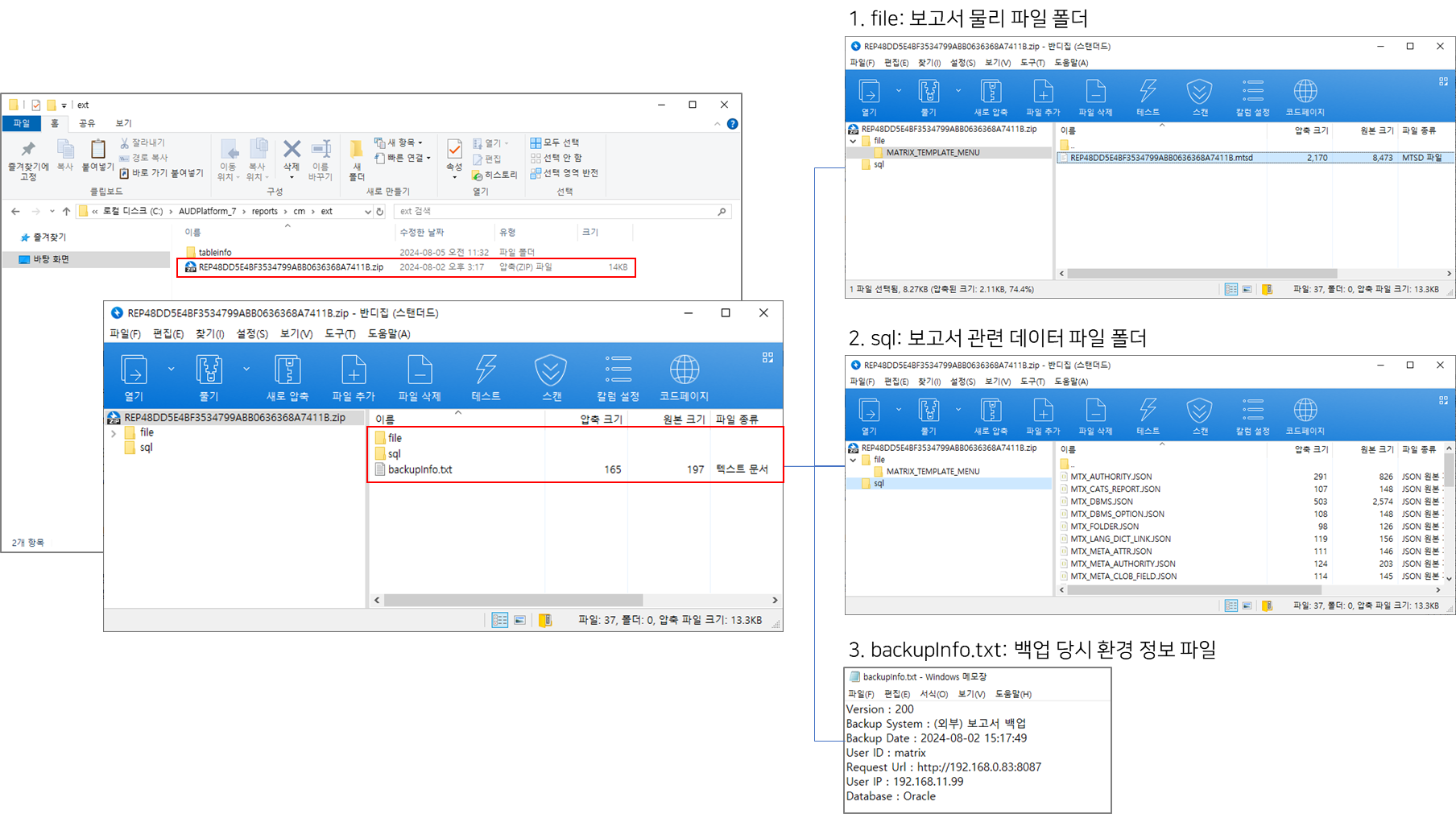
- 파일 예시
코드 블럭 language java theme Midnight firstline 1 title Sample_CmRestoreApi.java linenumbers true collapse true import javax.net.ssl.HttpsURLConnection; import javax.net.ssl.SSLContext; import javax.net.ssl.TrustManager; import javax.net.ssl.X509TrustManager; import java.io.BufferedReader; import java.io.IOException; import java.io.InputStreamReader; import java.io.OutputStream; import java.net.HttpURLConnection; import java.net.MalformedURLException; import java.net.URL; import java.security.cert.CertificateException; import java.security.cert.X509Certificate; import java.util.HashMap; import java.util.Map; public class CmRestoreApi { /** * AUD서버 주소 */ private static String AUD_SERVER_URL = "http://192.168.0.59:8087"; private static String apAccessToken = null; public static void main(String[] args) { if (args.length == 0){ System.err.println("restore file name check please...."); System.exit(1); // 오류 코드 1로 프로그램 종료 } /** * audApId , audApPw 는 AUD 플랫폼에 등록한 Application 공통 계정을 사용 * 파라메터로 전달 시에 암호화에 대한 처리하여 Application용 id / pw가 유출되지 않도록 구성 */ String audApId = "ap.test"; String audApPw = "ap.test"; HttpURLConnection connection = null; try{ // header 설정은 아래처럼 해주세요. Map<String, String> requestHeaders = new HashMap<>(); requestHeaders.put("X-AUD-AP-Id", audApId); requestHeaders.put("X-AUD-AP-Secret", audApPw); requestHeaders.put("X-AUD-USER", audApId); requestHeaders.put("X-AP-UPDATE-ADDR", "127.0.0.1"); try{ // URL 객체 생성 URL url = new URL(AUD_SERVER_URL+"/api/auth/sign/ap/token"); boolean isSecure = AUD_SERVER_URL.toLowerCase().startsWith("https:"); if(isSecure){ // https 연결 connection = (HttpsURLConnection)url.openConnection(); SSLContext sslContext = getSslContext(); ((HttpsURLConnection) connection).setSSLSocketFactory(sslContext.getSocketFactory()); ((HttpsURLConnection)connection).setHostnameVerifier((hostname, session) -> true); }else{ connection = (HttpURLConnection)url.openConnection(); } }catch(MalformedURLException e){ throw new Exception("AUD 플랫폼 주소가 잘못되었습니다."); }catch(IOException e){ System.out.println("==========IOException"); throw new Exception("연결이 실패했습니다 [api url:"+ AUD_SERVER_URL +"]"); } // HTTP 메서드 설정 connection.setRequestMethod("POST"); for(Map.Entry<String, String> header :requestHeaders.entrySet()) { connection.setRequestProperty(header.getKey(), header.getValue()); } // 응답 코드 확인 int responseCode = connection.getResponseCode(); if (responseCode == HttpURLConnection.HTTP_OK){ apAccessToken = connection.getHeaderField("bimatrix_ap_accessToken"); if (apAccessToken == null){ throw new Exception("ap token이 정상적으로 발급되지 않았습니다"); } } }catch(Exception e){ System.err.println(e.getMessage()); System.exit(1); // 오류 코드 1로 프로그램 종료 }finally { if (connection != null) { connection.disconnect(); } } // 토큰 발급 후에 복원 한다. String restoreFileName = args[0]; String authRestore = "false"; if (args.length == 2) authRestore = args[1]; String data = "{\"restoreFileName\" : \""+restoreFileName+"\" , \"authRestore\" : \"" + authRestore+"\"}"; try { String returnData = execute ("/api/cm/restore" , data , "POST"); System.out.println("======restore data : "+returnData); // 발급 토큰 삭제 api 추가 예정 String returnLogout = execute ("/api/logout" , "" , "GET"); System.out.println("======returnLogout data : "+returnLogout); } catch (Exception e) { e.printStackTrace(); } } public static String execute(String url, String params , String method) throws Exception{ HttpURLConnection connection = null; OutputStream outStream = null; BufferedReader bufferReader = null; try{ try{ // URL 객체 생성 URL url1 = new URL(AUD_SERVER_URL+url); boolean isSecure = AUD_SERVER_URL.toLowerCase().startsWith("https:"); if(isSecure){ // https 연결 connection = (HttpsURLConnection)url1.openConnection(); SSLContext sslContext = getSslContext(); ((HttpsURLConnection) connection).setSSLSocketFactory(sslContext.getSocketFactory()); ((HttpsURLConnection)connection).setHostnameVerifier((hostname, session) -> true); }else{ connection = (HttpURLConnection)url1.openConnection(); } }catch(MalformedURLException e){ throw new Exception("AUD 플랫폼 주소가 잘못되었습니다."); }catch(IOException e){ throw new Exception("연결이 실패했습니다"); } // HTTP 메서드 설정 connection.setRequestMethod(method); connection.setRequestProperty("bimatrix_ap_accessToken", apAccessToken); connection.setRequestProperty("Accept-Charset", "UTF-8"); connection.setConnectTimeout(10 * 1000); connection.setReadTimeout(300 * 1000); connection.setDoInput(true);// 응답 헤더와 메시지를 읽어들이겠다는 옵션 if (params != null && params.length() > 0){ connection.setDoOutput(true); connection.setRequestProperty("Content-Type", "application/json"); // JSON 설정 outStream = connection.getOutputStream(); outStream.write(params.getBytes("UTF-8")); outStream.flush(); outStream.close(); } // 응답 코드 확인 int responseCode = connection.getResponseCode(); if (responseCode == HttpURLConnection.HTTP_OK){ bufferReader = new BufferedReader( new InputStreamReader( connection.getInputStream(), "UTF-8" ) ); String inputText = ""; StringBuilder sbText = new StringBuilder(); while ((inputText = bufferReader.readLine()) != null) { if(sbText.length() > 0) sbText.append(inputText + "\r\n"); else sbText.append(inputText); } return sbText.toString(); } }catch(Exception e){ e.printStackTrace(); System.exit(1); // 오류 코드 1로 프로그램 종료 }finally { if (bufferReader != null) bufferReader.close(); if (outStream != null) outStream.close(); if (connection != null) connection.disconnect(); } return null ; } /* SSL을 사용일 경우 (https) */ private static SSLContext getSslContext() throws Exception{ SSLContext sslCTX = null; // TrustManager TrustManager[] trustManagers = null; trustManagers = new TrustManager[]{ new X509TrustManager() { @Override public void checkClientTrusted(X509Certificate[] x509Certificates, String s) throws CertificateException { } @Override public void checkServerTrusted(X509Certificate[] x509Certificates, String s) throws CertificateException { } @Override public X509Certificate[] getAcceptedIssuers() { //return new X509Certificate[0]; return null; } } }; // SSL context sslCTX = SSLContext.getInstance("TLS"); sslCTX.init(null, trustManagers, new java.security.SecureRandom()); return sslCTX; } }
- 백업 결과
- 파일 예시
- 파일 예시
- (기타) sh 파일로 API 호출 시 timeout 설정 방법
- CmBackupApi.java, CmRestoreApi.java 기본 timeout 설정
- Connect timeout(소켓 연결 제한 시간): 10초
- Read timeout(응답 제한 시간): 5분
SocketTimeoutException 발생 시, 아래 timeout 설정을 길게 늘려 사용하시기 바랍니다.
코드 블럭 language java theme Midnight firstline 1 title Sample_Timeout설정 linenumbers true collapse true // CmBackupApi.java -> 백업 대상 서버에 맞게 설정 // CmRestoreApi.java -> 복원 대상 서버에 맞게 설정 connection.setConnectTimeout(10 * 1000); // Connect timeout(연결 제한 시간): 10초 connection.setReadTimeout(300 * 1000); // Read timeout(응답 제한 시간): 5분
- CmBackupApi.java, CmRestoreApi.java 기본 timeout 설정
| 기능 정보 |
|
|
|
|
|
|
|
|---|---|---|---|---|---|---|---|
| 시작 버전 정보 |
| ||||||
| 정보 | ||
|---|---|---|
| ||
첨부 파일 | | patterns | .*jsp,.*zip,.*xml,.*js,.*mtsd,.*xlsx,.*xlsb,.*mtzb,.*mtvx,.*mtx,.*mtxz,.*mtsz,.*json,.*txt
| 정보 | ||
|---|---|---|
| ||
|
| 페이지 속성 | ||||||||||||||||||||||||||||||||||
|---|---|---|---|---|---|---|---|---|---|---|---|---|---|---|---|---|---|---|---|---|---|---|---|---|---|---|---|---|---|---|---|---|---|---|
| ||||||||||||||||||||||||||||||||||
|