Page No.
| Showpageid |
|---|
작성자 : / 검수자 :
Launch Release No. 7.3.500.20250722 / Latest Release No.
※ 주의 : 외부 포탈 임베디드(Project)방식의 SSO연동을 적용하기 위해 '1-0.공통 설정' 과정을 선행으로 설정해야 함
− 개요
> 외부 포탈 사이트에서 AUD7 보고서를 임베디드 방식으로 연동하기 위한 샘플 프로젝트
> Spring Boot(백엔드)에서 AUD7 서버와 인증을 처리하고, React 또는 Vue(프론트엔드)가 보고서 뷰어 UI를 제공
> 단 , 일부 기능이 크로스 도메인 block으로 처리 불가할 수 있음
(top , parent 접근 불가하여 postMessage 형식 등으로 커스텀 개발이 AUD플랫폼 내 적용되어야 함)
− 제약 사항
> 기본적으로 AP 토큰이 쿠키에 공유되어 사용되기 때문에 외부 PORTAL (타 사이트 포탈) 과 AUD7 플랫폼 PORTAL의 Domain name이 동일해야 된다.
> 외부 POTAL에서는 발급된 AP 인증 토큰이 정상적으로 브라우저 Cookie에 bimatrix_ap_accessToken으로 설정되어 있는지 확인이 필요하다.
| Easy Heading Macro | ||
|---|---|---|
|
1. 임베디드 서버 설정
1-1) application.yml 설정
> 사전준비에서 발급받은 키 정보를 바탕으로, 프로젝트 내 설정 파일들을 사이트 환경에 맞게 수정합니다.
파일 위치: {소스경로}/src/main/resources/application.yml
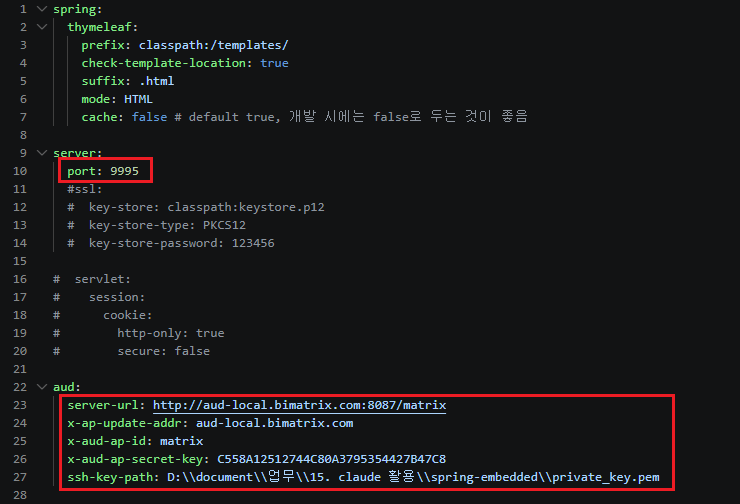
< 그림 1-1. application.yml 설정 정보 캡쳐 >
- port: 사이트 정책에 맞는 포트 번호
- server-url: AUD7 서버 주소로 변경
- x-ap-update-addr: AUD7 주소 도메인으로 변경
- x-aud-ap-id: '1-0.공통 설정' 에서 입력한 어플리케이션 명으로 변경
- x-aud-ap-secret-key: '1-0.공통 설정' 에서 발급받은 Secret Key로 변경
- ssh-key-path: '1-0.공통 설정' 에서 발급받은 private_key.pem 파일의 절대경로로 변경
1-2) 프론트엔드 도메인 설정
> SHARE_DOMAIN 값을 임베디드 서버와 AUD7 서버가 공유하는 상위 도메인으로 설정합니다.
파일 위치: {소스경로}/frontend/src/main.jsx
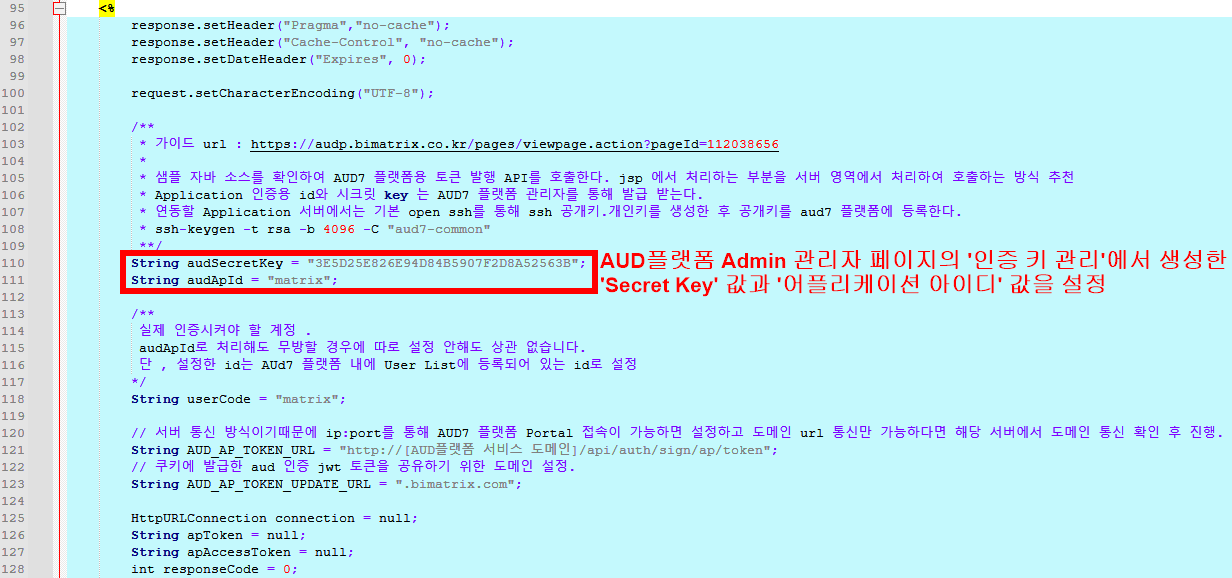
< 그림 1-1. 샘플 코드 인증 정보 설정 캡처 1 >
1-1-2) privateKey 설정 - 고객사 포탈 서버에 private_key.pem을 저장하고 경로를 지정
> loadPrivateKey 메서드 매개변수에 '인증 키 관리' 페이지에서 등록이 완료되면 발급되는 private_key.pem 파일의 위치를 설정
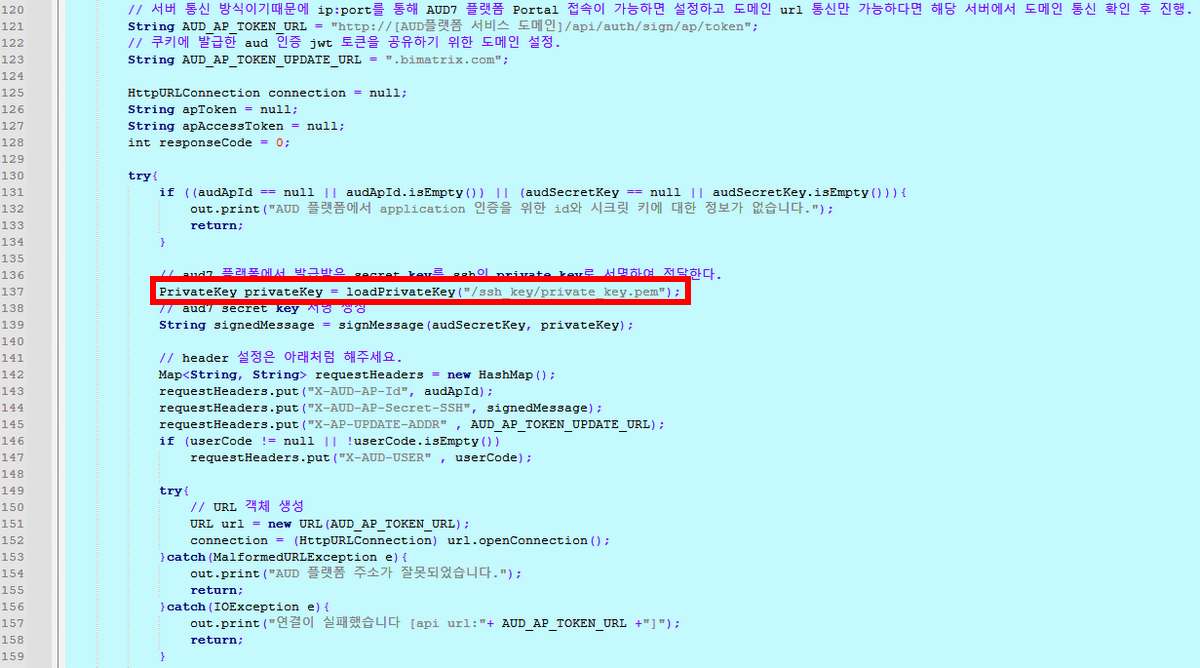
< 그림 1-2. 샘플 코드 인증 정보 설정 캡처 2 >
1-2) 인증 대상 유저 코드 설정
1-2-1) userCode 설정
> 실제 사이트에서 인증 시켜야 할 계정 값을 설정
(※ 주의 : 아래 샘플 코드엔 matrix로 고정된 값으로 구현했지만, 실제 구현 시 userCode는 유동적으로 변경하여 인증 과정을 실행해야 함)
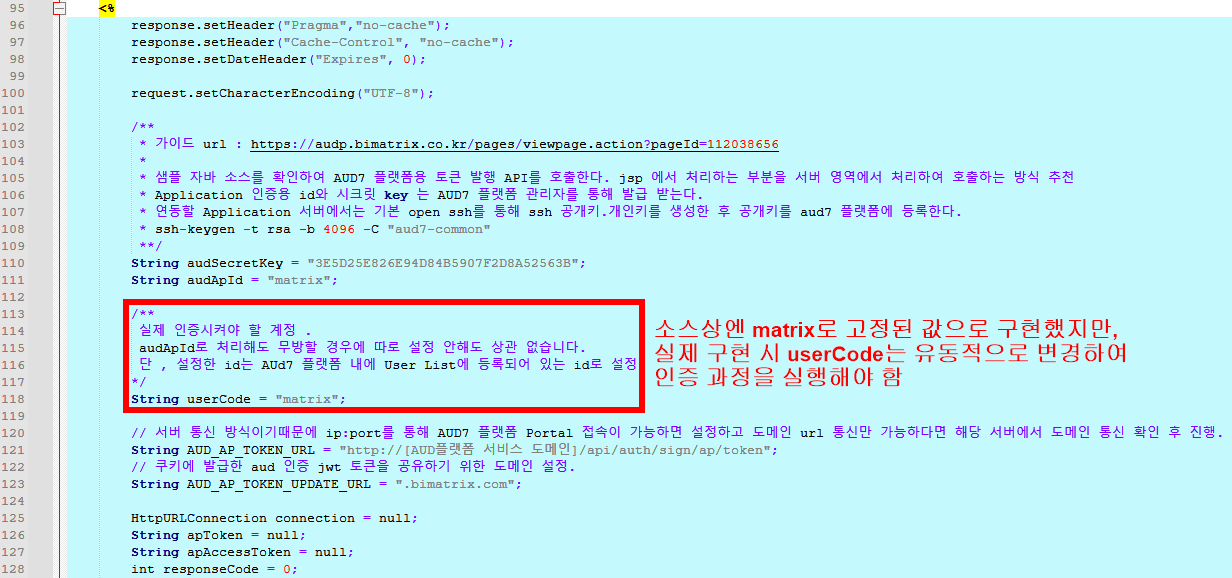
< 그림 1-3. 샘플 코드 인증 정보 설정 캡처 3 >
1-3) AUD 인증 AP 토큰 요청 및 도메인 설정
1-3-1) AUD_AP_TOKEN_URL 설정
> AUD플랫폼 경로 설정 (Ex. "http(s)://[IP:PORT+Context Root]/api/auth/sign/ap/token")
(※ 주의 : 서버 통신 방식이기 때문에 IP:PORT를 통해 AUD플랫폼 Portal접속이 가능하면 설정하고, 도메인 URL통신만 가능하다면 해당 서버에서 도메인 통신 확인 후 진행)
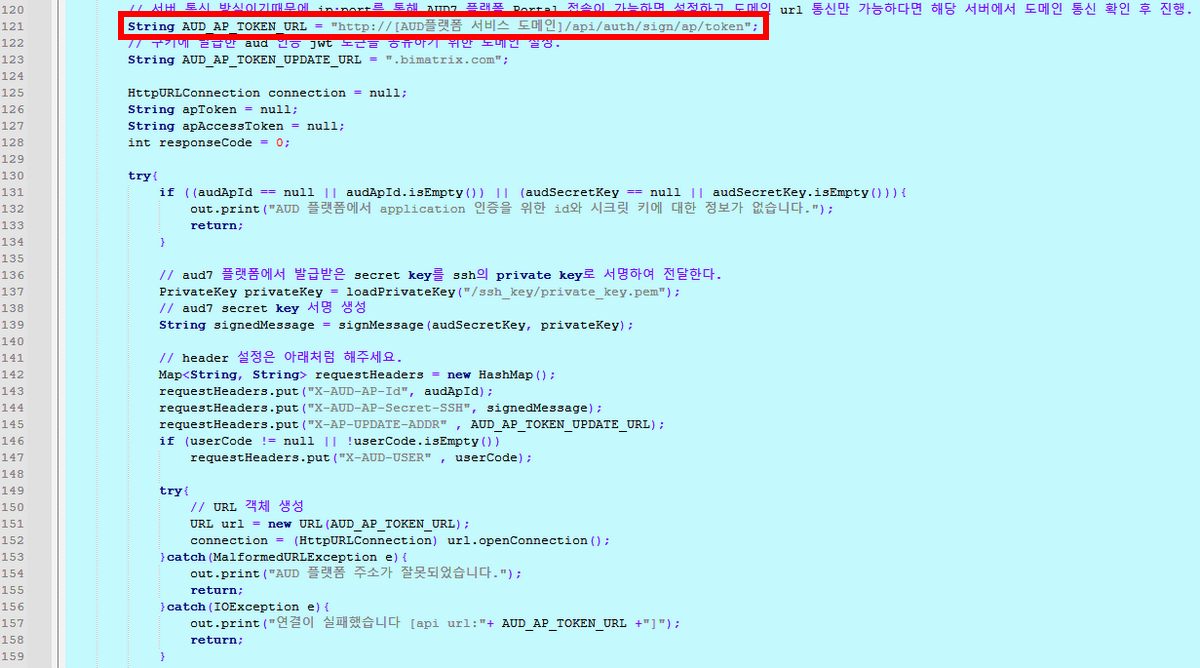
< 그림 1-4. 샘플 코드 인증 정보 설정 캡처 4 >
1-3-2) AUD_AP_TOKEN_UPDATE_URL 설정
> 쿠키에 발급한 AUD 인증 AP 토큰을 공유하기 위한 메인 도메인 설정.
(※ 참고 : 서브 도메인 허용, 컨테이너 허용, PORT 허용)
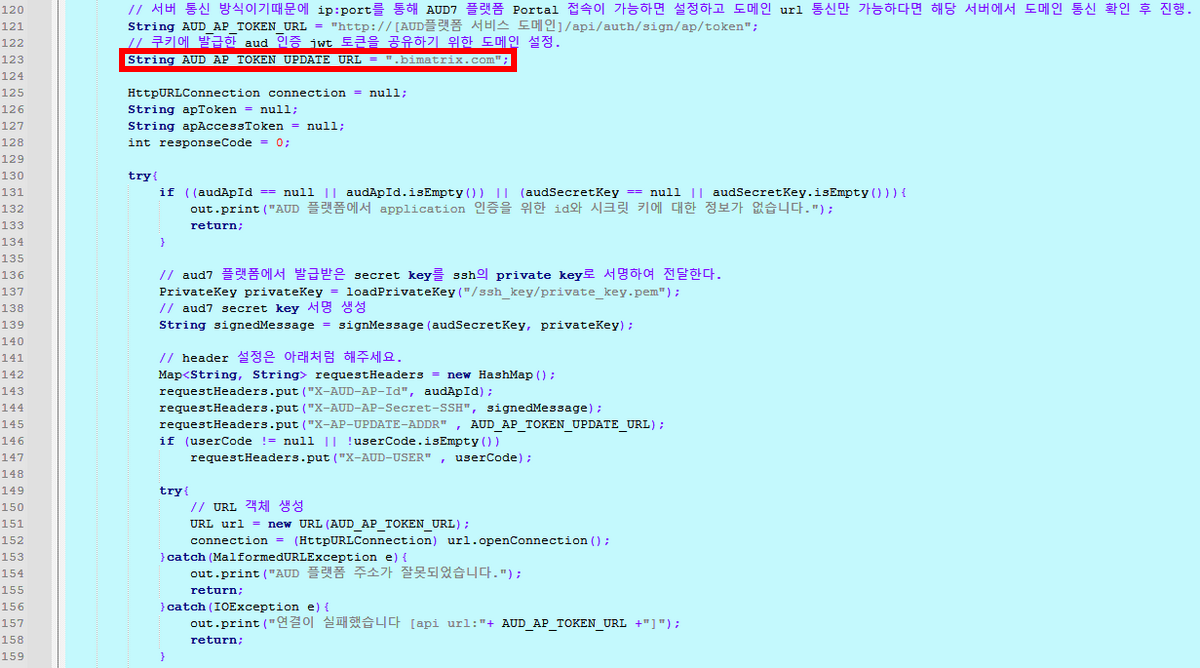
< 그림 1-5. 샘플 코드 인증 정보 설정 캡처 5 >
| 정보 | ||||||||||||||||||||
|---|---|---|---|---|---|---|---|---|---|---|---|---|---|---|---|---|---|---|---|---|
| ||||||||||||||||||||
- AUD 인증 AP 토큰 발급 API는 AUD 플랫폼에 등록한 Application용 클라이언트 아이디와 클라이언트 시크릿를 인증 정보로 설정하여 Application 인증 JWT 토큰을 발급 합니다.
|
1-2) 인증 정보 설정
1-1-1) audSecretKey, audApId 설정
2. aud.embedded.setting.jsp 설정 - sitePortalAUD7EmSample.jsp에서 참조하는 Config파일을 설정
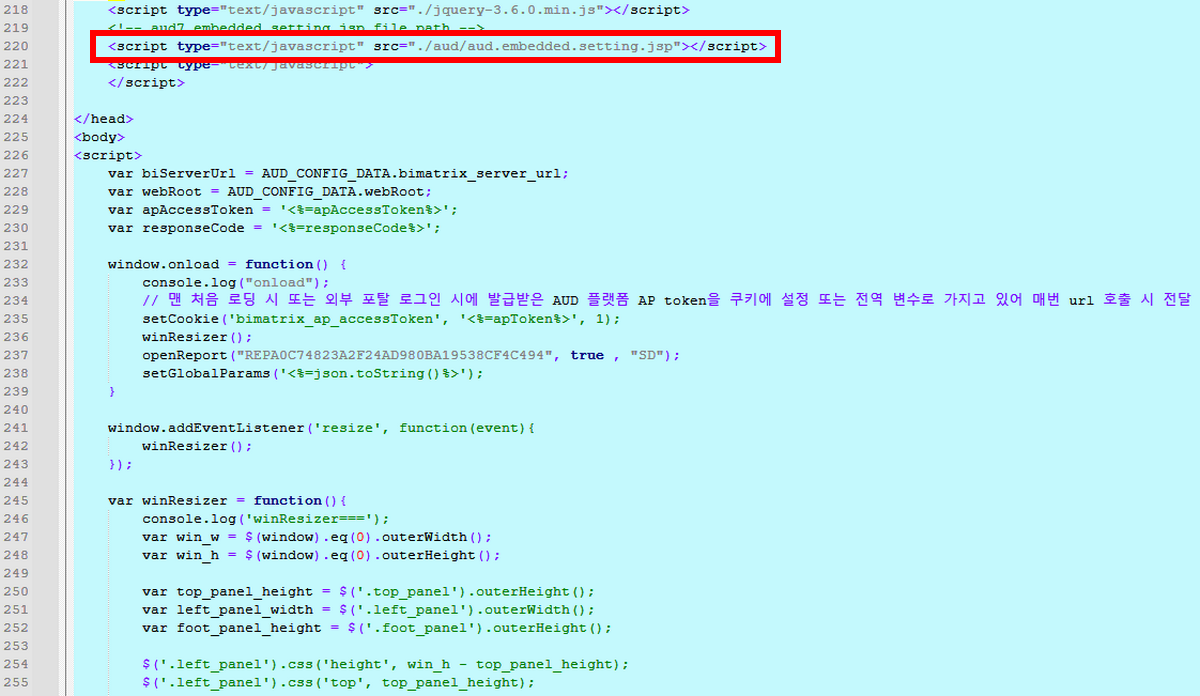
< 그림 1-6. 샘플 코드의 Config 참조 캡처 >
2-1) AUD_CONFIG_DATA 설정 - sitePortalAUD7EmSample.jsp에서 참조하는 Config파일 에서 설정
- bimatrix_server_url 설정 : AUD플랫폼의 IP:PORT + Context Root로 설정
- webRoot 설정 : 고객사 포탈 임베디드 소스가 위치한 경로를 설정
※ Admin 시스템 관리 > 시스템 옵션 > [시스템 실행 옵션]의 WEBROOT 값을 통해 확인 가능합니다.
- cookie_domain 설정 : 토큰을 공유하기 위한 도메인 설정
임베딩의 기본 전제 조건은 고객사 포털과 임베딩할 AUD7의 서브도메인은 달라도 메인 도메인이 같아야 합니다.
ex) 고객사 포탈 도메인: portal.client.com, AUD 제품 포탈 도메인: aud7.client.com
DATA.cookie_domain = .client.com;
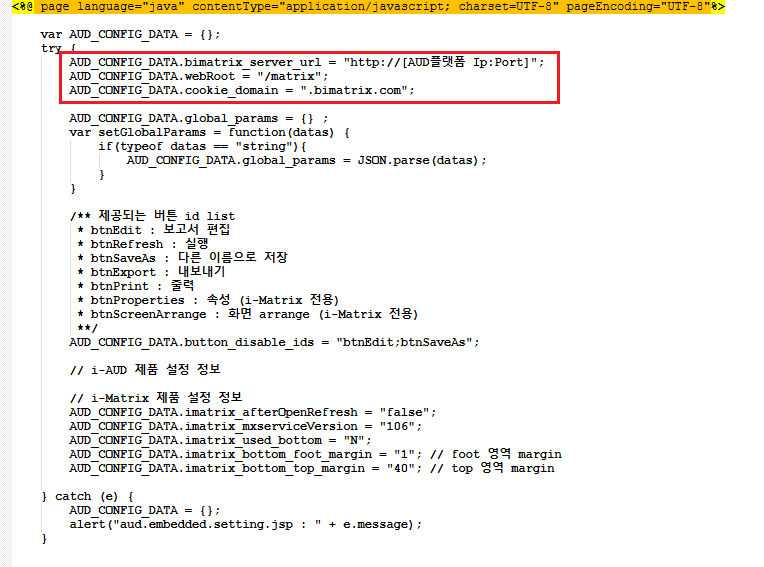
< 그림 1-7. 샘플 코드 Config 설정 캡처 >
3. AUD보고서 iFrame 임베디드 방법
> openReport 함수를 사용하여 'REPORT_AUD'라는 iFrame에 i-AUD 보고서를 임베디드
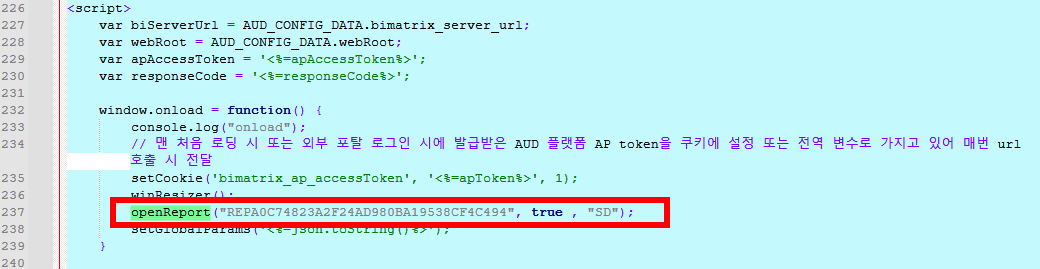
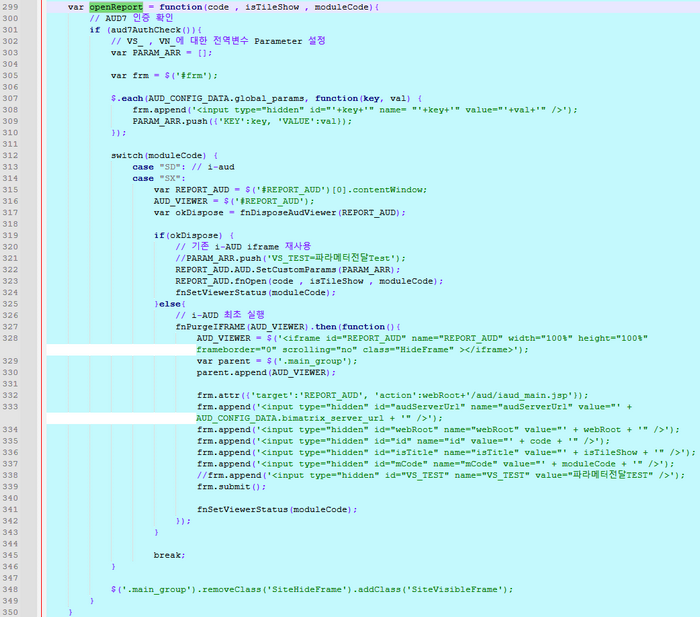
< 그림 1-8. 샘플 코드 보고서 호출부 캡처 >
| 코드 블럭 | ||||||||||||
|---|---|---|---|---|---|---|---|---|---|---|---|---|
| ||||||||||||
spring:
  thymeleaf:
    prefix: classpath:/templates/
    check-template-location: true
    suffix: .html
    mode: HTML
    cache: false # default true, 개발 시에는 false로 두는 것이 좋음


server:
  port: 9995
  #ssl:
  #  key-store: classpath:keystore.p12
  #  key-store-type: PKCS12
  #  key-store-password: 123456

#  servlet:
#    session:
#      cookie:
#        http-only: true
#        secure: false

aud:
  server-url: {AUD7 서버 주소로 변경}
  x-ap-update-addr: {AUD7 주소 도메인으로 변경}
  x-aud-ap-id: {'1-0.공통 설정'에서 입력한 어플리케이션 명으로 변경}
  x-aud-ap-secret-key: {'1-0.공통 설정'에서 발급받은 Secret Key로 변경}
  ssh-key-path: {'1-0.공통 설정'에서 발급받은 private_key.pem 파일의 절대경로로 변경}
|
| 코드 블럭 | ||||||||||
|---|---|---|---|---|---|---|---|---|---|---|
| ||||||||||
import './assets/imatrix_header.css'

import { createRoot } from 'react-dom/client'
import DivViewer from './DivViewer.jsx'
import IframeViewer from './IframeViewer.jsx'

// ─────────────────────────────────────────────────────────────────
// 공통 초기화: 전역 변수 등록 & 토큰 쿠키 설정
// (mode에 관계없이 React 앱 로드 전에 선행 실행)
// ─────────────────────────────────────────────────────────────────
const audServerUrl = window.IIT_DATA.audServerUrl
const SHARE_DOMAIN = {임베디드 서버와 AUD7 서버가 공유하는 상위 도메인으로 설정}
const AUD7_PATH = audServerUrl + '/AUD/500'

window.AUD7_PATH = AUD7_PATH
window.AUD7_SETTING_PATH = AUD7_PATH
window.SHARE_DOMAIN = SHARE_DOMAIN
window.gvWebRootName = audServerUrl

// 인증 토큰 쿠키 등록
const exdate = new Date()
exdate.setDate(exdate.getDate() + 1)
document.cookie = `bimatrix_ap_accessToken=${window.IIT_DATA.token}; expires=${exdate.toUTCString()}; path=/; domain=${SHARE_DOMAIN}`

// ─────────────────────────────────────────────────────────────────
// mode에 따라 컴포넌트 분기
//   div    → App.jsx
//   iframe → IframeViewer.jsx
// ─────────────────────────────────────────────────────────────────
const mode = window.IIT_DATA.mode || 'div'
const Root = mode === 'iframe' ? IframeViewer : DivViewer

// 주의: React 18 StrictMode는 useEffect를 개발 모드에서 두 번 실행시키므로,
// AUD 외부 스크립트가 중복 로드되는 부작용이 있어 본 임베디드 시나리오에서는 사용하지 않는다.
createRoot(document.getElementById('root')).render(<Root />)
|
| 코드 블럭 | ||||||||||
|---|---|---|---|---|---|---|---|---|---|---|
| ||||||||||
import { useEffect, useRef } from 'react'
import './layout.css'


// IIT_DATA 추출
const audServerUrl = window.IIT_DATA.audServerUrl

// 보고서 목록 (데모용 — 실제 보고서 코드로 교체)
const reportList = [
    { name: {좌측에 표시할 보고서 명}, code: {AUD7에 등록된 보고서 코드}, module: {보고서 모듈 코드}, isShow: {타이틀바 표시 여부} },
    { name: 'i-AUD 보고서 호출2', code: 'REP236AB97070714FA3AC22F9DFD00AFFF3', module: 'SD', isShow: false },
]

// 컴포넌트 외부 모듈 스코프에 두는 가변 상태
// (외부 AUD JS 가 직접 DOM 을 조작하므로 React 리렌더링이 필요 없어 useState 대신 plain object 사용)
const state = {
    reportInfo: null,
    rName: '',
    folderCode: '',
    description: '',
    moduleCode: '',
    TemplateCode: '',
    reportId: '',
}

// React 18 StrictMode 미사용이지만, 혹시 모를 중복 마운트에 대비한 가드
let initialized = false

function DivViewer() {
    const errorRef = useRef({ show: false, message: '' })

    useEffect(() => {
        if (initialized) return
        initialized = true

        try {
            loadExternalResources(audServerUrl)
            winResizer()
            if (window.GFN_AUTHORITY && window.GFN_AUTHORITY.UpdateSession) {
                window.GFN_AUTHORITY.UpdateSession()
            }

            const handleResize = () => {
                winResizer()
                if (window.AUD && window.AUD.GetMainViewer) {
                    const mainViewer = window.AUD.GetMainViewer()
                    if (mainViewer && mainViewer.ViewerSizeChanged) mainViewer.ViewerSizeChanged()
                }
            }
            window.addEventListener('resize', handleResize)
            return () => window.removeEventListener('resize', handleResize)
        } catch (e) {
            handleError('초기화 중 오류가 발생했습니다.', e)
        }
    }, [])

    function handleError(message, error) {
        errorRef.current = { show: true, message: `${message} (${error.message || error})` }
        console.error(message, error)
    }

    return (
        <>
            <div className="top_panel"></div>
            <div className="left_panel">
                <ul>
                    {reportList.map(report => (
                        <li key={report.code}>
                            <div
                                className="rep_div"
                                onClick={() => openReport(report.code, report.isShow, report.module)}
                            >
                                {report.name}
                            </div>
                        </li>
                    ))}
                </ul>
            </div>
            <div className="main_group VisibleFrame">
                <div className="titlebg" id="titlebg_main" style={{ display: 'none' }}>
                    <div className="title_area">
                        <ul>
                            <li><span id="dvReportName"></span></li>
                        </ul>
                    </div>
                    <div className="bookmark" id="bookmarkIcon" style={{ display: 'none' }}></div>
                    <div className="location" style={{ display: 'none' }}></div>
                    <div className="topbtn_group"></div>
                </div>
                <div id="AUDview" className="istudio-common-viewer"></div>
            </div>
            <div className="foot_panel"></div>
        </>
    )
}

// ─────────────────────────────────────────────────────────────────
// 외부 리소스 로드 (AUD 프레임워크 JS/CSS)
// ─────────────────────────────────────────────────────────────────
function loadExternalResources(serverUrl) {
    const head = document.head
    const scripts = [
        '/AUD/500/js/lib/audframework/debug/bimatrix.lib.audframework.js',
        '/AUD/500/js/lib/audframework/debug/bimatrix.module.audframework.js',
        '/AUD/500/js/lib/rsa/jsbn.js',
        '/AUD/500/js/lib/rsa/prng4.js',
        '/AUD/500/js/lib/rsa/rng.js',
        '/AUD/500/js/lib/rsa/rsa.js',
        '/portal/js/jquery-3.6.0.min.js',
        '/portal/js/Base64.js',
        '/portal/js/jquery.portal.common.js',
        '/portal/js/jquery.cookie.js',
        '/portal/js/authorityCheck_em.jsp',
        '/portal/js/portal.message.jsp',
        '/portal/js/portal.option.data.jsp',
        '/portal/js/portal.content.top.js',
        '/portal/js/matrix.script.comm.js',
        '/portal/js/matrix.script.content.em.js',
        '/portal/js/portal.content.bookmark.js',
        '/portal/js/portal.content.condition.js',
        '/extention/AUD/customscript.jsp',
        '/extention/portal/customscript.jsp',
    ]
    const styles = [
        '/AUD/500/theme/skin-default/ko/css/bimatrix.module.audframework.css',
        '/AUD/500/theme/skin-default/ko/css/ion.rangeSlider.css',
        '/extention/AUD/bimatrix.custom.audframework.css',
    ]

    styles.forEach(path => {
        const link = document.createElement('link')
        link.rel = 'stylesheet'
        link.href = serverUrl + path
        head.appendChild(link)
    })
    scripts.forEach(path => {
        const script = document.createElement('script')
        script.src = serverUrl + path
        script.async = false
        // GFN_OPTION을 정의하는 스크립트가 로드된 직후 portal 테마 CSS를 동적으로 추가
        if (path.endsWith('portal.option.data.jsp')) {
            script.onload = () => loadPortalThemeCss(serverUrl)
        }
        head.appendChild(script)
    })
}

function loadPortalThemeCss(serverUrl) {
    const opt = window.GFN_OPTION
    if (!opt || !opt.PORTAL_THEME_CSS_PATH) return
    const root = opt.WEB_ROOTNAME || ''
    const baseUrl = (root && serverUrl.endsWith(root))
        ? serverUrl.slice(0, -root.length)
        : serverUrl
    const link = document.createElement('link')
    link.rel = 'stylesheet'
    link.href = `${baseUrl}${opt.PORTAL_THEME_CSS_PATH}/theme.css`
    document.head.appendChild(link)
}

// ─────────────────────────────────────────────────────────────────
// 보고서 호출
// ─────────────────────────────────────────────────────────────────
function openReport(code, isTitle, module) {
    state.reportId = code
    state.moduleCode = module

    const PARAM_ARR = [{ KEY: 'VS_TEST', VALUE: 'VS_TEST1_VAL' }]
    if (window.AUD) window.AUD.SetCustomParams(PARAM_ARR)

    if (window.GFN_AUTHORITY && window.GFN_AUTHORITY.searchReportInfo) {
        state.reportInfo = window.GFN_AUTHORITY.searchReportInfo(code)
        state.rName = state.reportInfo.name
        state.folderCode = state.reportInfo.option.FolderCode
        state.description = state.reportInfo.desc
    }

    if (window.GFN_AUTHORITY && window.GFN_AUTHORITY.USER_AUTH_INFO) window.GFN_AUTHORITY.USER_AUTH_INFO()

    if (isTitle) {
        const btnType = (window.GFN_OPTION && window.GFN_OPTION.OP04_VIEW_BTN === 'TEXT') ? 'text_type' : 'img_type'

        if (window.$ && typeof window.$('.topbtn_group').option_top === 'function') {
            window.$('.topbtn_group').option_top('view_btn', {
                btn_type: btnType,
                callbackFn: settingTitle,
                embedded: true,
            })
        }
    } else {
        document.querySelector('.titlebg').style.display = 'none'
        winResizer()
    }

    if (module === 'SD') {
        if (window.AUD && window.AUD.Init) window.AUD.Init(AudOpenReport)
    } else if (module === 'SX') {
        window.AUD.ShellModuleCode = 'SX'
        if (window.AUD && window.AUD.Init) window.AUD.Init(MetaOpenReport)
    }
}

function AudOpenReport() {
    if (window.AUD && window.AUD.SetFileDialogCallback) window.AUD.SetFileDialogCallback()
    if (window.AUD) window.AUD.LoadDocument('AUDview', state.reportId, 2)
}

function MetaOpenReport() {
    const metaInfo = {
        META_CODE: state.reportId,
        NAME: state.rName,
        DESC: state.description,
        PARENT: state.folderCode,
        TYPE: state.moduleCode,
    }
    window.AUD.MetaViewManager.IsMetaFileView = true
    window.AUD.mViewerId = 'AUDview'
    window.AUD.LoadMetaDocument('AUDview', state.reportId, metaInfo)
}

// ─────────────────────────────────────────────────────────────────
// 타이틀 / 메뉴 버튼 셋업 (option_top 콜백)
// ─────────────────────────────────────────────────────────────────
function settingTitle() {
    document.querySelector('.titlebg').style.display = ''
    const info = state.reportInfo
    if (!info) return
    if (window.setReportInfo) window.setReportInfo(
        info.code,
        info.name,
        info.desc,
        info.module,
        info.path,
        '',
        { FolderCode: info.option.FolderCode }
    )
    if (window.menuVisible) window.menuVisible(
        info.code,
        info.module,
        { AuthNo: info.option.AuthNo },
        false
    )
    const buttons = ['btnEdit', 'btnSaveAs', 'btnExport']
    buttons.forEach(id => {
        const el = document.getElementById(id)
        if (el) el.style.display = 'none'
    })
    settingReportInfo(info.name)
    winResizer()
}

function settingReportInfo(name) {
    const el = document.querySelector('.titlebg #dvReportName')
    if (!el) return
    el.innerText = name
    el.classList.add('title_bullet')
    const opt = window.GFN_OPTION || {}
    const root = opt.WEB_ROOTNAME || ''
    const baseUrl = (root && audServerUrl.endsWith(root))
        ? audServerUrl.slice(0, -root.length)
        : audServerUrl
    const imgUrl = `${baseUrl}${opt.PORTAL_THEME_IMG_PATH}/tree/tree_iaud.png`
    el.style.background = `url('${imgUrl}') 0px 0px no-repeat`
}

// ─────────────────────────────────────────────────────────────────
// 리사이즈 처리
// ─────────────────────────────────────────────────────────────────
function winResizer() {
    const win_w = window.innerWidth
    const win_h = window.innerHeight

    const topPanel = document.querySelector('.top_panel')
    const leftPanel = document.querySelector('.left_panel')
    const footPanel = document.querySelector('.foot_panel')
    const titleBg = document.querySelector('.titlebg')
    const viewPanel = document.querySelector('.view_panel')
    const audView = document.getElementById('AUDview')

    const top_panel_height = (topPanel && topPanel.offsetHeight) || 0
    const left_panel_width = (leftPanel && leftPanel.offsetWidth) || 0
    const foot_panel_height = (footPanel && footPanel.offsetHeight) || 0

    if (leftPanel) {
        leftPanel.style.height = `${win_h - top_panel_height}px`
        leftPanel.style.top = `${top_panel_height}px`
    }

    const mainGroup = document.querySelector('.main_group')
    if (mainGroup) {
        mainGroup.style.height = `${win_h - top_panel_height - foot_panel_height}px`
        mainGroup.style.top = `${top_panel_height}px`
        mainGroup.style.left = `${left_panel_width}px`
        mainGroup.style.width = `${win_w - left_panel_width}px`
    }

    let title_panel_height = (titleBg && titleBg.offsetHeight) || 0
    const isHidden = titleBg && getComputedStyle(titleBg).display === 'none'
    if (isHidden) {
        title_panel_height = 0
    } else {
        settingReportTitleWidth()
    }

    if (viewPanel) {
        viewPanel.style.height = `${win_h}px`
        viewPanel.style.width = `${win_w}px`
    }

    if (audView) {
        audView.style.top = `${title_panel_height}px`
        audView.style.height = `${win_h - top_panel_height - foot_panel_height - title_panel_height}px`
    }
}

function settingReportTitleWidth() {
    const titleEl = document.querySelector('#titlebg_main')
    const topArea = titleEl ? titleEl.querySelector('.topbtn_area') : null
    const bullet = titleEl ? titleEl.querySelector('.title_bullet') : null

    if (!titleEl || !topArea || !bullet) return

    const titlebg_w = titleEl.offsetWidth
    const title_topbtn_w = topArea.offsetWidth
    const title_reportName_w = titlebg_w - title_topbtn_w

    bullet.style.width = `${title_reportName_w}px`
}

export default DivViewer |
| 코드 블럭 | ||||||||||
|---|---|---|---|---|---|---|---|---|---|---|
| ||||||||||
import { useEffect, useRef } from 'react'
import './layout.css'


const audServerUrl = window.IIT_DATA.audServerUrl
const webRoot = window.IIT_DATA.webRoot

// 보고서 목록 (데모용 — 실제 보고서 코드로 교체)
const reportList = [
    { name: {좌측에 표시할 보고서 명}, code: {AUD7에 등록된 보고서 코드}, module: {보고서 모듈 코드}, isShow: {타이틀바 표시 여부} },
    { name: 'i-AUD 보고서 호출2', code: 'REP236AB97070714FA3AC22F9DFD00AFFF3', module: 'SD', isShow: false },
]

let initialized = false

function IframeViewer() {
    const iframeRef = useRef(null)
    const formRef = useRef(null)
    const loaded = useRef(false)

    useEffect(() => {
        if (initialized) return
        initialized = true

        winResizer()

        const handleResize = () => {
            winResizer()
            sendResize()
        }
        window.addEventListener('resize', handleResize)
        return () => window.removeEventListener('resize', handleResize)
    }, [])

    // ── iframe 내부로 resize 메시지 전송 ──
    function sendResize() {
        try {
            if (iframeRef.current && iframeRef.current.contentWindow) {
                iframeRef.current.contentWindow.postMessage(JSON.stringify({ type: 'resize' }), '*')
            }
        } catch (e) { /* cross-origin 무시 */ }
    }

    // ── form POST로 iframe 최초 로드 ──
    function submitForm(code, isTitle, module) {
        const form = formRef.current
        if (!form) return
        form.innerHTML = ''
        form.target = 'REPORT_AUD'
        form.action = webRoot + '/iaud_main_view'

        const fields = { audServerUrl, id: code, isTitle: String(isTitle), mCode: module }
        Object.entries(fields).forEach(([name, value]) => {
            const input = document.createElement('input')
            input.type = 'hidden'
            input.name = name
            input.value = value
            form.appendChild(input)
        })
        form.submit()
        loaded.current = true
    }

    // ── 보고서 호출 (최초: form POST / 이후: fnOpen 재사용) ──
    function openReport(code, isTitle, module) {
        if (!iframeRef.current) return

        if (loaded.current) {
            try {
                const w = iframeRef.current.contentWindow
                const viewer = (w.AUD && w.AUD.GetMainViewer) ? w.AUD.GetMainViewer() : null
                if (viewer && viewer.Dispose) try { viewer.Dispose() } catch (e) {}
                if (w.AUD && w.AUD.SetCustomParams) w.AUD.SetCustomParams([{ KEY: 'VS_TEST', VALUE: 'VS_TEST1_VAL' }])
                w.fnOpen(code, isTitle, module)
                return
            } catch (e) {
                console.log('iframe reuse failed:', e.message)
            }
        }
        submitForm(code, isTitle, module)
    }

    // ── 레이아웃 리사이즈 (titlebg는 iframe 내부에서 처리) ──
    function winResizer() {
        const win_w = window.innerWidth
        const win_h = window.innerHeight

        const topPanel = document.querySelector('.top_panel')
        const leftPanel = document.querySelector('.left_panel')
        const footPanel = document.querySelector('.foot_panel')
        const audView = document.getElementById('AUDview')

        const top_panel_height = (topPanel && topPanel.offsetHeight) || 0
        const left_panel_width = (leftPanel && leftPanel.offsetWidth) || 0
        const foot_panel_height = (footPanel && footPanel.offsetHeight) || 0

        if (leftPanel) {
            leftPanel.style.height = `${win_h - top_panel_height}px`
            leftPanel.style.top = `${top_panel_height}px`
        }

        const mainGroup = document.querySelector('.main_group')
        if (mainGroup) {
            mainGroup.style.height = `${win_h - top_panel_height - foot_panel_height}px`
            mainGroup.style.top = `${top_panel_height}px`
            mainGroup.style.left = `${left_panel_width}px`
            mainGroup.style.width = `${win_w - left_panel_width}px`
        }

        if (audView) {
            audView.style.height = `${win_h - top_panel_height - foot_panel_height}px`
            sendResize()
        }
    }

    return (
        <>
            <div className="top_panel"></div>
            <div className="left_panel">
                <ul>
                    {reportList.map(report => (
                        <li key={report.code}>
                            <div
                                className="rep_div"
                                onClick={() => openReport(report.code, report.isShow, report.module)}
                            >
                                {report.name}
                            </div>
                        </li>
                    ))}
                </ul>
            </div>
            <div className="main_group VisibleFrame">
                <iframe
                    ref={iframeRef}
                    id="AUDview"
                    name="REPORT_AUD"
                    className="istudio-common-viewer"
                    frameBorder="0"
                    scrolling="no"
                    style={{
                        border: 'none',
                        display: 'block',
                        position: 'absolute',
                        left: 0,
                        top: 0,
                        width: '100%',
                        height: '100%',
                    }}
                />
                <form ref={formRef} method="post" style={{ display: 'none' }} />
            </div>
            <div className="foot_panel"></div>
        </>
    )
}

export default IframeViewer |
| 코드 블럭 | ||||||||||||
|---|---|---|---|---|---|---|---|---|---|---|---|---|
| ||||||||||||
package com.aud.embedded;

import com.fasterxml.jackson.core.JsonProcessingException;
import com.fasterxml.jackson.databind.ObjectMapper;
import org.springframework.beans.factory.annotation.Qualifier;
import org.springframework.beans.factory.annotation.Value;
import org.springframework.http.HttpStatus;
import org.springframework.http.ResponseEntity;
import org.springframework.stereotype.Service;
import org.springframework.web.reactive.function.client.WebClient;
import org.springframework.web.reactive.function.client.WebClientRequestException;
import org.springframework.web.reactive.function.client.WebClientResponseException;
import org.thymeleaf.util.StringUtils;
import java.security.*;
import java.nio.file.Files;
import java.nio.file.Paths;
import java.security.spec.PKCS8EncodedKeySpec;
import java.util.*;
import java.util.concurrent.atomic.AtomicReference;

@Service
public class AudAction {
    private final WebClient audWebClient;
    private final String audApId;
    private final String audApSecretFilePath;
    private final String apUpdateAddr;
    private final String audSecretKey;

    public AudAction(@Qualifier("audWebClient") WebClient audWebClient
                  ,  @Value("${aud.x-aud-ap-id}") String audApId
                  ,  @Value("${aud.ssh-key-path}") String audApSecretFilePath
                  ,  @Value("${aud.x-ap-update-addr}") String apUpdateAddr
                  ,  @Value("${aud.x-aud-ap-secret-key}") String audSecretKey) {
        this.audWebClient = audWebClient;
        this.audApId = audApId;
        this.audApSecretFilePath = audApSecretFilePath;
        this.apUpdateAddr = apUpdateAddr;
        this.audSecretKey = audSecretKey;
    }

    public String getAccessToken() throws Exception {
        AtomicReference<String> apToken = new AtomicReference<>("");
        // Application 공통 계정으로 토큰 발급하여 공통으로 사용할 경우는 로그인 유저의 코드를 따로 전달하지 않아도 됩니다.
        // 해당 부분은 실제 인증을 받고 나서 외부 포탈로 로그인한 사용자를 기준으로 토큰 발급을 원할 경우에 처리합니다.
        // 로그인 유저는 백엔드에서 세션에서 확인 후 각 사이트별로 관리하는 방법으로 확인합니다.
        String loginUserCode = {AUD7 유저 코드};

        try {
            // aud7 플랫폼에서 발급받은 secret key를 ssh의 private key로 서명하여 전달한다.
            PrivateKey privateKey = loadPrivateKey(audApSecretFilePath);
            // aud7 secret key 서명 생성
            String signedMessage = signMessage(audSecretKey, privateKey);

            ResponseEntity<String> res =
                    audWebClient.post()
                            .uri("/api/auth/sign/ap/token")
                            .headers(headers -> {
                                headers.set("X-AUD-AP-Id", audApId);
                                headers.set("X-AUD-AP-Secret-SSH", signedMessage);
                                headers.set("X-AP-UPDATE-ADDR", apUpdateAddr);
                                headers.set("X-AUD-USER", loginUserCode);
                            })
                            .retrieve()
                            .toEntity(String.class)
                            .block();
            if (res == null) throw new Exception("");
            res.getHeaders().get("bimatrix_ap_accessToken").stream().findFirst().ifPresent(apToken::set);
            if (StringUtils.isEmpty(apToken.get()))
                throw new Exception("token empty");
        } catch (WebClientRequestException e) {
            e.printStackTrace();
            // throw
        } catch (WebClientResponseException e) {
            if (HttpStatus.UNAUTHORIZED == e.getStatusCode()) {
                e.printStackTrace();
                // 인증 실패
                // throw
            } else {
                e.printStackTrace();
                // throw
                ;
            }

        }catch (Exception e){
            e.printStackTrace();
        }

        return apToken.get();
    }

    // 개인 키 로딩
    private static PrivateKey loadPrivateKey(String path) throws Exception {
        // 개인 키 로딩 로직을 구현 (파일 파싱 또는 다른 방법으로)
        System.out.println("Private Key path: " + path);
        String keyPEM = new String(Files.readAllBytes(Paths.get(path)))
                .replaceAll("-----BEGIN PRIVATE KEY-----", "")
                .replaceAll("-----END PRIVATE KEY-----", "")
                .replaceAll("\\s", "");  // 모든 공백 제거

        byte[] keyBytes = Base64.getDecoder().decode(keyPEM);
        PKCS8EncodedKeySpec keySpec = new PKCS8EncodedKeySpec(keyBytes);
        KeyFactory keyFactory = KeyFactory.getInstance("RSA");
        return keyFactory.generatePrivate(keySpec);
    }

    // 메시지 서명
    private static String signMessage(String message, PrivateKey privateKey) throws Exception {
        Signature signature = Signature.getInstance("SHA256withRSA");
        signature.initSign(privateKey);
        signature.update(message.getBytes());

        byte[] signedBytes = signature.sign();
        return Base64.getEncoder().encodeToString(signedBytes);
    }

    public String getAudMainJsonParam(Map<String, String[]> paramMap) {
        final ObjectMapper mapper = new ObjectMapper();
        String json = "";
        List<Map<String, String>> paramList = new ArrayList<>();
        for (String key : paramMap.keySet()) {
            if(!key.startsWith("VS") && !key.startsWith("VN") && !key.startsWith("V_")) continue;
            paramList.add(
                new HashMap<>() {{
                    put("KEY", key);
                    Arrays.stream(paramMap.get(key)).findFirst().ifPresent(value -> {
                        put("VALUE", value);
                    });
                }}
            );
        }
        try {
            json = mapper.writeValueAsString(paramList);
        } catch (JsonProcessingException e) {
            //throw new Exception(e.getMessage());
        }
        return json;
    }
} |
| 정보 | ||||||
|---|---|---|---|---|---|---|
| ||||||
|
Launch Release No. 7.3.500.20250722 / Latest Release No.
※ 주의 : 외부 포탈 임베디드(Project)방식의 SSO연동을 적용하기 위해 '1-0.공통 설정' 과정을 선행으로 설정해야 함
− 개요
> 외부 포탈 사이트에서 AUD7 보고서를 임베디드 방식으로 연동하기 위한 샘플 프로젝트
> Spring Boot(백엔드)에서 AUD7 서버와 인증을 처리하고, React 또는 Vue(프론트엔드)가 보고서 뷰어 UI를 제공
> 단 , 일부 기능이 크로스 도메인 block으로 처리 불가할 수 있음
(top , parent 접근 불가하여 postMessage 형식 등으로 커스텀 개발이 AUD플랫폼 내 적용되어야 함)
− 제약 사항
> 기본적으로 AP 토큰이 쿠키에 공유되어 사용되기 때문에 외부 PORTAL (타 사이트 포탈) 과 AUD7 플랫폼 PORTAL의 Domain name이 동일해야 된다.
> 외부 POTAL에서는 발급된 AP 인증 토큰이 정상적으로 브라우저 Cookie에 bimatrix_ap_accessToken으로 설정되어 있는지 확인이 필요하다.
| Easy Heading Macro | ||
|---|---|---|
|
< 그림 1-1. 샘플 코드 인증 정보 설정 캡처 1 >
1-1-2) privateKey 설정 - 고객사 포탈 서버에 private_key.pem을 저장하고 경로를 지정
> loadPrivateKey 메서드 매개변수에 '인증 키 관리' 페이지에서 등록이 완료되면 발급되는 private_key.pem 파일의 위치를 설정
< 그림 1-2. 샘플 코드 인증 정보 설정 캡처 2 >
1-2) 인증 대상 유저 코드 설정
1-2-1) userCode 설정
> 실제 사이트에서 인증 시켜야 할 계정 값을 설정
(※ 주의 : 아래 샘플 코드엔 matrix로 고정된 값으로 구현했지만, 실제 구현 시 userCode는 유동적으로 변경하여 인증 과정을 실행해야 함)
< 그림 1-3. 샘플 코드 인증 정보 설정 캡처 3 >
1-3) AUD 인증 AP 토큰 요청 및 도메인 설정
1-3-1) AUD_AP_TOKEN_URL 설정
> AUD플랫폼 경로 설정 (Ex. "http(s)://[IP:PORT+Context Root]/api/auth/sign/ap/token")
(※ 주의 : 서버 통신 방식이기 때문에 IP:PORT를 통해 AUD플랫폼 Portal접속이 가능하면 설정하고, 도메인 URL통신만 가능하다면 해당 서버에서 도메인 통신 확인 후 진행)
< 그림 1-4. 샘플 코드 인증 정보 설정 캡처 4 >
1-3-2) AUD_AP_TOKEN_UPDATE_URL 설정
> 쿠키에 발급한 AUD 인증 AP 토큰을 공유하기 위한 메인 도메인 설정.
(※ 참고 : 서브 도메인 허용, 컨테이너 허용, PORT 허용)
< 그림 1-5. 샘플 코드 인증 정보 설정 캡처 5 >
1. Application.yml 설정
1-1) 인증 정보 설정
1-1-1) audSecretKey, audApId 설정
2. aud.embedded.setting.jsp 설정 - sitePortalAUD7EmSample.jsp에서 참조하는 Config파일을 설정
< 그림 1-6. 샘플 코드의 Config 참조 캡처 >
2-1) AUD_CONFIG_DATA 설정 - sitePortalAUD7EmSample.jsp에서 참조하는 Config파일 에서 설정
- bimatrix_server_url 설정 : AUD플랫폼의 IP:PORT + Context Root로 설정
- webRoot 설정 : 고객사 포탈 임베디드 소스가 위치한 경로를 설정
※ Admin 시스템 관리 > 시스템 옵션 > [시스템 실행 옵션]의 WEBROOT 값을 통해 확인 가능합니다.
- cookie_domain 설정 : 토큰을 공유하기 위한 도메인 설정
임베딩의 기본 전제 조건은 고객사 포털과 임베딩할 AUD7의 서브도메인은 달라도 메인 도메인이 같아야 합니다.
ex) 고객사 포탈 도메인: portal.client.com, AUD 제품 포탈 도메인: aud7.client.com
DATA.cookie_domain = .client.com;
< 그림 1-7. 샘플 코드 Config 설정 캡처 >
3. AUD보고서 iFrame 임베디드 방법
> openReport 함수를 사용하여 'REPORT_AUD'라는 iFrame에 i-AUD 보고서를 임베디드
< 그림 1-8. 샘플 코드 보고서 호출부 캡처 >
| 코드 블럭 | ||||||||||||
|---|---|---|---|---|---|---|---|---|---|---|---|---|
| ||||||||||||
spring:
  thymeleaf:
    prefix: classpath:/templates/
    check-template-location: true
    suffix: .html
    mode: HTML
    cache: false # default true, 개발 시에는 false로 두는 것이 좋음


server:
  port: 9995
  #ssl:
  #  key-store: classpath:keystore.p12
  #  key-store-type: PKCS12
  #  key-store-password: 123456

#  servlet:
#    session:
#      cookie:
#        http-only: true
#        secure: false

aud:
  server-url: {AUD7 서버 주소로 변경}
  x-ap-update-addr: {AUD7 주소 도메인으로 변경}
  x-aud-ap-id: {'1-0.공통 설정'에서 입력한 어플리케이션 명으로 변경}
  x-aud-ap-secret-key: {'1-0.공통 설정'에서 발급받은 Secret Key로 변경}
  ssh-key-path: {'1-0.공통 설정'에서 발급받은 private_key.pem 파일의 절대경로로 변경}
|
| 코드 블럭 | ||||||||||
|---|---|---|---|---|---|---|---|---|---|---|
| ||||||||||
import './assets/imatrix_header.css'

import { createRoot } from 'react-dom/client'
import DivViewer from './DivViewer.jsx'
import IframeViewer from './IframeViewer.jsx'

// ─────────────────────────────────────────────────────────────────
// 공통 초기화: 전역 변수 등록 & 토큰 쿠키 설정
// (mode에 관계없이 React 앱 로드 전에 선행 실행)
// ─────────────────────────────────────────────────────────────────
const audServerUrl = window.IIT_DATA.audServerUrl
const SHARE_DOMAIN = {임베디드 서버와 AUD7 서버가 공유하는 상위 도메인으로 설정}
const AUD7_PATH = audServerUrl + '/AUD/500'

window.AUD7_PATH = AUD7_PATH
window.AUD7_SETTING_PATH = AUD7_PATH
window.SHARE_DOMAIN = SHARE_DOMAIN
window.gvWebRootName = audServerUrl

// 인증 토큰 쿠키 등록
const exdate = new Date()
exdate.setDate(exdate.getDate() + 1)
document.cookie = `bimatrix_ap_accessToken=${window.IIT_DATA.token}; expires=${exdate.toUTCString()}; path=/; domain=${SHARE_DOMAIN}`

// ─────────────────────────────────────────────────────────────────
// mode에 따라 컴포넌트 분기
//   div    → App.jsx
//   iframe → IframeViewer.jsx
// ─────────────────────────────────────────────────────────────────
const mode = window.IIT_DATA.mode || 'div'
const Root = mode === 'iframe' ? IframeViewer : DivViewer

// 주의: React 18 StrictMode는 useEffect를 개발 모드에서 두 번 실행시키므로,
// AUD 외부 스크립트가 중복 로드되는 부작용이 있어 본 임베디드 시나리오에서는 사용하지 않는다.
createRoot(document.getElementById('root')).render(<Root />)
|
| 코드 블럭 | ||||||||||
|---|---|---|---|---|---|---|---|---|---|---|
| ||||||||||
import { useEffect, useRef } from 'react'
import './layout.css'


// IIT_DATA 추출
const audServerUrl = window.IIT_DATA.audServerUrl

// 보고서 목록 (데모용 — 실제 보고서 코드로 교체)
const reportList = [
    { name: {좌측에 표시할 보고서 명}, code: {AUD7에 등록된 보고서 코드}, module: {보고서 모듈 코드}, isShow: {타이틀바 표시 여부} },
    { name: 'i-AUD 보고서 호출2', code: 'REP236AB97070714FA3AC22F9DFD00AFFF3', module: 'SD', isShow: false },
]

// 컴포넌트 외부 모듈 스코프에 두는 가변 상태
// (외부 AUD JS 가 직접 DOM 을 조작하므로 React 리렌더링이 필요 없어 useState 대신 plain object 사용)
const state = {
    reportInfo: null,
    rName: '',
    folderCode: '',
    description: '',
    moduleCode: '',
    TemplateCode: '',
    reportId: '',
}

// React 18 StrictMode 미사용이지만, 혹시 모를 중복 마운트에 대비한 가드
let initialized = false

function DivViewer() {
    const errorRef = useRef({ show: false, message: '' })

    useEffect(() => {
        if (initialized) return
        initialized = true

        try {
            loadExternalResources(audServerUrl)
            winResizer()
            if (window.GFN_AUTHORITY && window.GFN_AUTHORITY.UpdateSession) {
                window.GFN_AUTHORITY.UpdateSession()
            }

            const handleResize = () => {
                winResizer()
                if (window.AUD && window.AUD.GetMainViewer) {
                    const mainViewer = window.AUD.GetMainViewer()
                    if (mainViewer && mainViewer.ViewerSizeChanged) mainViewer.ViewerSizeChanged()
                }
            }
            window.addEventListener('resize', handleResize)
            return () => window.removeEventListener('resize', handleResize)
        } catch (e) {
            handleError('초기화 중 오류가 발생했습니다.', e)
        }
    }, [])

    function handleError(message, error) {
        errorRef.current = { show: true, message: `${message} (${error.message || error})` }
        console.error(message, error)
    }

    return (
        <>
            <div className="top_panel"></div>
            <div className="left_panel">
                <ul>
                    {reportList.map(report => (
                        <li key={report.code}>
                            <div
                                className="rep_div"
                                onClick={() => openReport(report.code, report.isShow, report.module)}
                            >
                                {report.name}
                            </div>
                        </li>
                    ))}
                </ul>
            </div>
            <div className="main_group VisibleFrame">
                <div className="titlebg" id="titlebg_main" style={{ display: 'none' }}>
                    <div className="title_area">
                        <ul>
                            <li><span id="dvReportName"></span></li>
                        </ul>
                    </div>
                    <div className="bookmark" id="bookmarkIcon" style={{ display: 'none' }}></div>
                    <div className="location" style={{ display: 'none' }}></div>
                    <div className="topbtn_group"></div>
                </div>
                <div id="AUDview" className="istudio-common-viewer"></div>
            </div>
            <div className="foot_panel"></div>
        </>
    )
}

// ─────────────────────────────────────────────────────────────────
// 외부 리소스 로드 (AUD 프레임워크 JS/CSS)
// ─────────────────────────────────────────────────────────────────
function loadExternalResources(serverUrl) {
    const head = document.head
    const scripts = [
        '/AUD/500/js/lib/audframework/debug/bimatrix.lib.audframework.js',
        '/AUD/500/js/lib/audframework/debug/bimatrix.module.audframework.js',
        '/AUD/500/js/lib/rsa/jsbn.js',
        '/AUD/500/js/lib/rsa/prng4.js',
        '/AUD/500/js/lib/rsa/rng.js',
        '/AUD/500/js/lib/rsa/rsa.js',
        '/portal/js/jquery-3.6.0.min.js',
        '/portal/js/Base64.js',
        '/portal/js/jquery.portal.common.js',
        '/portal/js/jquery.cookie.js',
        '/portal/js/authorityCheck_em.jsp',
        '/portal/js/portal.message.jsp',
        '/portal/js/portal.option.data.jsp',
        '/portal/js/portal.content.top.js',
        '/portal/js/matrix.script.comm.js',
        '/portal/js/matrix.script.content.em.js',
        '/portal/js/portal.content.bookmark.js',
        '/portal/js/portal.content.condition.js',
        '/extention/AUD/customscript.jsp',
        '/extention/portal/customscript.jsp',
    ]
    const styles = [
        '/AUD/500/theme/skin-default/ko/css/bimatrix.module.audframework.css',
        '/AUD/500/theme/skin-default/ko/css/ion.rangeSlider.css',
        '/extention/AUD/bimatrix.custom.audframework.css',
    ]

    styles.forEach(path => {
        const link = document.createElement('link')
        link.rel = 'stylesheet'
        link.href = serverUrl + path
        head.appendChild(link)
    })
    scripts.forEach(path => {
        const script = document.createElement('script')
        script.src = serverUrl + path
        script.async = false
        // GFN_OPTION을 정의하는 스크립트가 로드된 직후 portal 테마 CSS를 동적으로 추가
        if (path.endsWith('portal.option.data.jsp')) {
            script.onload = () => loadPortalThemeCss(serverUrl)
        }
        head.appendChild(script)
    })
}

function loadPortalThemeCss(serverUrl) {
    const opt = window.GFN_OPTION
    if (!opt || !opt.PORTAL_THEME_CSS_PATH) return
    const root = opt.WEB_ROOTNAME || ''
    const baseUrl = (root && serverUrl.endsWith(root))
        ? serverUrl.slice(0, -root.length)
        : serverUrl
    const link = document.createElement('link')
    link.rel = 'stylesheet'
    link.href = `${baseUrl}${opt.PORTAL_THEME_CSS_PATH}/theme.css`
    document.head.appendChild(link)
}

// ─────────────────────────────────────────────────────────────────
// 보고서 호출
// ─────────────────────────────────────────────────────────────────
function openReport(code, isTitle, module) {
    state.reportId = code
    state.moduleCode = module

    const PARAM_ARR = [{ KEY: 'VS_TEST', VALUE: 'VS_TEST1_VAL' }]
    if (window.AUD) window.AUD.SetCustomParams(PARAM_ARR)

    if (window.GFN_AUTHORITY && window.GFN_AUTHORITY.searchReportInfo) {
        state.reportInfo = window.GFN_AUTHORITY.searchReportInfo(code)
        state.rName = state.reportInfo.name
        state.folderCode = state.reportInfo.option.FolderCode
        state.description = state.reportInfo.desc
    }

    if (window.GFN_AUTHORITY && window.GFN_AUTHORITY.USER_AUTH_INFO) window.GFN_AUTHORITY.USER_AUTH_INFO()

    if (isTitle) {
        const btnType = (window.GFN_OPTION && window.GFN_OPTION.OP04_VIEW_BTN === 'TEXT') ? 'text_type' : 'img_type'

        if (window.$ && typeof window.$('.topbtn_group').option_top === 'function') {
            window.$('.topbtn_group').option_top('view_btn', {
                btn_type: btnType,
                callbackFn: settingTitle,
                embedded: true,
            })
        }
    } else {
        document.querySelector('.titlebg').style.display = 'none'
        winResizer()
    }

    if (module === 'SD') {
        if (window.AUD && window.AUD.Init) window.AUD.Init(AudOpenReport)
    } else if (module === 'SX') {
        window.AUD.ShellModuleCode = 'SX'
        if (window.AUD && window.AUD.Init) window.AUD.Init(MetaOpenReport)
    }
}

function AudOpenReport() {
    if (window.AUD && window.AUD.SetFileDialogCallback) window.AUD.SetFileDialogCallback()
    if (window.AUD) window.AUD.LoadDocument('AUDview', state.reportId, 2)
}

function MetaOpenReport() {
    const metaInfo = {
        META_CODE: state.reportId,
        NAME: state.rName,
        DESC: state.description,
        PARENT: state.folderCode,
        TYPE: state.moduleCode,
    }
    window.AUD.MetaViewManager.IsMetaFileView = true
    window.AUD.mViewerId = 'AUDview'
    window.AUD.LoadMetaDocument('AUDview', state.reportId, metaInfo)
}

// ─────────────────────────────────────────────────────────────────
// 타이틀 / 메뉴 버튼 셋업 (option_top 콜백)
// ─────────────────────────────────────────────────────────────────
function settingTitle() {
    document.querySelector('.titlebg').style.display = ''
    const info = state.reportInfo
    if (!info) return
    if (window.setReportInfo) window.setReportInfo(
        info.code,
        info.name,
        info.desc,
        info.module,
        info.path,
        '',
        { FolderCode: info.option.FolderCode }
    )
    if (window.menuVisible) window.menuVisible(
        info.code,
        info.module,
        { AuthNo: info.option.AuthNo },
        false
    )
    const buttons = ['btnEdit', 'btnSaveAs', 'btnExport']
    buttons.forEach(id => {
        const el = document.getElementById(id)
        if (el) el.style.display = 'none'
    })
    settingReportInfo(info.name)
    winResizer()
}

function settingReportInfo(name) {
    const el = document.querySelector('.titlebg #dvReportName')
    if (!el) return
    el.innerText = name
    el.classList.add('title_bullet')
    const opt = window.GFN_OPTION || {}
    const root = opt.WEB_ROOTNAME || ''
    const baseUrl = (root && audServerUrl.endsWith(root))
        ? audServerUrl.slice(0, -root.length)
        : audServerUrl
    const imgUrl = `${baseUrl}${opt.PORTAL_THEME_IMG_PATH}/tree/tree_iaud.png`
    el.style.background = `url('${imgUrl}') 0px 0px no-repeat`
}

// ─────────────────────────────────────────────────────────────────
// 리사이즈 처리
// ─────────────────────────────────────────────────────────────────
function winResizer() {
    const win_w = window.innerWidth
    const win_h = window.innerHeight

    const topPanel = document.querySelector('.top_panel')
    const leftPanel = document.querySelector('.left_panel')
    const footPanel = document.querySelector('.foot_panel')
    const titleBg = document.querySelector('.titlebg')
    const viewPanel = document.querySelector('.view_panel')
    const audView = document.getElementById('AUDview')

    const top_panel_height = (topPanel && topPanel.offsetHeight) || 0
    const left_panel_width = (leftPanel && leftPanel.offsetWidth) || 0
    const foot_panel_height = (footPanel && footPanel.offsetHeight) || 0

    if (leftPanel) {
        leftPanel.style.height = `${win_h - top_panel_height}px`
        leftPanel.style.top = `${top_panel_height}px`
    }

    const mainGroup = document.querySelector('.main_group')
    if (mainGroup) {
        mainGroup.style.height = `${win_h - top_panel_height - foot_panel_height}px`
        mainGroup.style.top = `${top_panel_height}px`
        mainGroup.style.left = `${left_panel_width}px`
        mainGroup.style.width = `${win_w - left_panel_width}px`
    }

    let title_panel_height = (titleBg && titleBg.offsetHeight) || 0
    const isHidden = titleBg && getComputedStyle(titleBg).display === 'none'
    if (isHidden) {
        title_panel_height = 0
    } else {
        settingReportTitleWidth()
    }

    if (viewPanel) {
        viewPanel.style.height = `${win_h}px`
        viewPanel.style.width = `${win_w}px`
    }

    if (audView) {
        audView.style.top = `${title_panel_height}px`
        audView.style.height = `${win_h - top_panel_height - foot_panel_height - title_panel_height}px`
    }
}

function settingReportTitleWidth() {
    const titleEl = document.querySelector('#titlebg_main')
    const topArea = titleEl ? titleEl.querySelector('.topbtn_area') : null
    const bullet = titleEl ? titleEl.querySelector('.title_bullet') : null

    if (!titleEl || !topArea || !bullet) return

    const titlebg_w = titleEl.offsetWidth
    const title_topbtn_w = topArea.offsetWidth
    const title_reportName_w = titlebg_w - title_topbtn_w

    bullet.style.width = `${title_reportName_w}px`
}

export default DivViewer |
| 코드 블럭 | ||||||||||
|---|---|---|---|---|---|---|---|---|---|---|
| ||||||||||
import { useEffect, useRef } from 'react'
import './layout.css'


const audServerUrl = window.IIT_DATA.audServerUrl
const webRoot = window.IIT_DATA.webRoot

// 보고서 목록 (데모용 — 실제 보고서 코드로 교체)
const reportList = [
    { name: {좌측에 표시할 보고서 명}, code: {AUD7에 등록된 보고서 코드}, module: {보고서 모듈 코드}, isShow: {타이틀바 표시 여부} },
    { name: 'i-AUD 보고서 호출2', code: 'REP236AB97070714FA3AC22F9DFD00AFFF3', module: 'SD', isShow: false },
]

let initialized = false

function IframeViewer() {
    const iframeRef = useRef(null)
    const formRef = useRef(null)
    const loaded = useRef(false)

    useEffect(() => {
        if (initialized) return
        initialized = true

        winResizer()

        const handleResize = () => {
            winResizer()
            sendResize()
        }
        window.addEventListener('resize', handleResize)
        return () => window.removeEventListener('resize', handleResize)
    }, [])

    // ── iframe 내부로 resize 메시지 전송 ──
    function sendResize() {
        try {
            if (iframeRef.current && iframeRef.current.contentWindow) {
                iframeRef.current.contentWindow.postMessage(JSON.stringify({ type: 'resize' }), '*')
            }
        } catch (e) { /* cross-origin 무시 */ }
    }

    // ── form POST로 iframe 최초 로드 ──
    function submitForm(code, isTitle, module) {
        const form = formRef.current
        if (!form) return
        form.innerHTML = ''
        form.target = 'REPORT_AUD'
        form.action = webRoot + '/iaud_main_view'

        const fields = { audServerUrl, id: code, isTitle: String(isTitle), mCode: module }
        Object.entries(fields).forEach(([name, value]) => {
            const input = document.createElement('input')
            input.type = 'hidden'
            input.name = name
            input.value = value
            form.appendChild(input)
        })
        form.submit()
        loaded.current = true
    }

    // ── 보고서 호출 (최초: form POST / 이후: fnOpen 재사용) ──
    function openReport(code, isTitle, module) {
        if (!iframeRef.current) return

        if (loaded.current) {
            try {
                const w = iframeRef.current.contentWindow
                const viewer = (w.AUD && w.AUD.GetMainViewer) ? w.AUD.GetMainViewer() : null
                if (viewer && viewer.Dispose) try { viewer.Dispose() } catch (e) {}
                if (w.AUD && w.AUD.SetCustomParams) w.AUD.SetCustomParams([{ KEY: 'VS_TEST', VALUE: 'VS_TEST1_VAL' }])
                w.fnOpen(code, isTitle, module)
                return
            } catch (e) {
                console.log('iframe reuse failed:', e.message)
            }
        }
        submitForm(code, isTitle, module)
    }

    // ── 레이아웃 리사이즈 (titlebg는 iframe 내부에서 처리) ──
    function winResizer() {
        const win_w = window.innerWidth
        const win_h = window.innerHeight

        const topPanel = document.querySelector('.top_panel')
        const leftPanel = document.querySelector('.left_panel')
        const footPanel = document.querySelector('.foot_panel')
        const audView = document.getElementById('AUDview')

        const top_panel_height = (topPanel && topPanel.offsetHeight) || 0
        const left_panel_width = (leftPanel && leftPanel.offsetWidth) || 0
        const foot_panel_height = (footPanel && footPanel.offsetHeight) || 0

        if (leftPanel) {
            leftPanel.style.height = `${win_h - top_panel_height}px`
            leftPanel.style.top = `${top_panel_height}px`
        }

        const mainGroup = document.querySelector('.main_group')
        if (mainGroup) {
            mainGroup.style.height = `${win_h - top_panel_height - foot_panel_height}px`
            mainGroup.style.top = `${top_panel_height}px`
            mainGroup.style.left = `${left_panel_width}px`
            mainGroup.style.width = `${win_w - left_panel_width}px`
        }

        if (audView) {
            audView.style.height = `${win_h - top_panel_height - foot_panel_height}px`
            sendResize()
        }
    }

    return (
        <>
            <div className="top_panel"></div>
            <div className="left_panel">
                <ul>
                    {reportList.map(report => (
                        <li key={report.code}>
                            <div
                                className="rep_div"
                                onClick={() => openReport(report.code, report.isShow, report.module)}
                            >
                                {report.name}
                            </div>
                        </li>
                    ))}
                </ul>
            </div>
            <div className="main_group VisibleFrame">
                <iframe
                    ref={iframeRef}
                    id="AUDview"
                    name="REPORT_AUD"
                    className="istudio-common-viewer"
                    frameBorder="0"
                    scrolling="no"
                    style={{
                        border: 'none',
                        display: 'block',
                        position: 'absolute',
                        left: 0,
                        top: 0,
                        width: '100%',
                        height: '100%',
                    }}
                />
                <form ref={formRef} method="post" style={{ display: 'none' }} />
            </div>
            <div className="foot_panel"></div>
        </>
    )
}

export default IframeViewer |
| 코드 블럭 | ||||||||||||
|---|---|---|---|---|---|---|---|---|---|---|---|---|
| ||||||||||||
package com.aud.embedded;

import com.fasterxml.jackson.core.JsonProcessingException;
import com.fasterxml.jackson.databind.ObjectMapper;
import org.springframework.beans.factory.annotation.Qualifier;
import org.springframework.beans.factory.annotation.Value;
import org.springframework.http.HttpStatus;
import org.springframework.http.ResponseEntity;
import org.springframework.stereotype.Service;
import org.springframework.web.reactive.function.client.WebClient;
import org.springframework.web.reactive.function.client.WebClientRequestException;
import org.springframework.web.reactive.function.client.WebClientResponseException;
import org.thymeleaf.util.StringUtils;
import java.security.*;
import java.nio.file.Files;
import java.nio.file.Paths;
import java.security.spec.PKCS8EncodedKeySpec;
import java.util.*;
import java.util.concurrent.atomic.AtomicReference;

@Service
public class AudAction {
    private final WebClient audWebClient;
    private final String audApId;
    private final String audApSecretFilePath;
    private final String apUpdateAddr;
    private final String audSecretKey;

    public AudAction(@Qualifier("audWebClient") WebClient audWebClient
                  ,  @Value("${aud.x-aud-ap-id}") String audApId
                  ,  @Value("${aud.ssh-key-path}") String audApSecretFilePath
                  ,  @Value("${aud.x-ap-update-addr}") String apUpdateAddr
                  ,  @Value("${aud.x-aud-ap-secret-key}") String audSecretKey) {
        this.audWebClient = audWebClient;
        this.audApId = audApId;
        this.audApSecretFilePath = audApSecretFilePath;
        this.apUpdateAddr = apUpdateAddr;
        this.audSecretKey = audSecretKey;
    }

    public String getAccessToken() throws Exception {
        AtomicReference<String> apToken = new AtomicReference<>("");
        // Application 공통 계정으로 토큰 발급하여 공통으로 사용할 경우는 로그인 유저의 코드를 따로 전달하지 않아도 됩니다.
        // 해당 부분은 실제 인증을 받고 나서 외부 포탈로 로그인한 사용자를 기준으로 토큰 발급을 원할 경우에 처리합니다.
        // 로그인 유저는 백엔드에서 세션에서 확인 후 각 사이트별로 관리하는 방법으로 확인합니다.
        String loginUserCode = {AUD7 유저 코드};

        try {
            // aud7 플랫폼에서 발급받은 secret key를 ssh의 private key로 서명하여 전달한다.
            PrivateKey privateKey = loadPrivateKey(audApSecretFilePath);
            // aud7 secret key 서명 생성
            String signedMessage = signMessage(audSecretKey, privateKey);

            ResponseEntity<String> res =
                    audWebClient.post()
                            .uri("/api/auth/sign/ap/token")
                            .headers(headers -> {
                                headers.set("X-AUD-AP-Id", audApId);
                                headers.set("X-AUD-AP-Secret-SSH", signedMessage);
                                headers.set("X-AP-UPDATE-ADDR", apUpdateAddr);
                                headers.set("X-AUD-USER", loginUserCode);
                            })
                            .retrieve()
                            .toEntity(String.class)
                            .block();
            if (res == null) throw new Exception("");
            res.getHeaders().get("bimatrix_ap_accessToken").stream().findFirst().ifPresent(apToken::set);
            if (StringUtils.isEmpty(apToken.get()))
                throw new Exception("token empty");
        } catch (WebClientRequestException e) {
            e.printStackTrace();
            // throw
        } catch (WebClientResponseException e) {
            if (HttpStatus.UNAUTHORIZED == e.getStatusCode()) {
                e.printStackTrace();
                // 인증 실패
                // throw
            } else {
                e.printStackTrace();
                // throw
                ;
            }

        }catch (Exception e){
            e.printStackTrace();
        }

        return apToken.get();
    }

    // 개인 키 로딩
    private static PrivateKey loadPrivateKey(String path) throws Exception {
        // 개인 키 로딩 로직을 구현 (파일 파싱 또는 다른 방법으로)
        System.out.println("Private Key path: " + path);
        String keyPEM = new String(Files.readAllBytes(Paths.get(path)))
                .replaceAll("-----BEGIN PRIVATE KEY-----", "")
                .replaceAll("-----END PRIVATE KEY-----", "")
                .replaceAll("\\s", "");  // 모든 공백 제거

        byte[] keyBytes = Base64.getDecoder().decode(keyPEM);
        PKCS8EncodedKeySpec keySpec = new PKCS8EncodedKeySpec(keyBytes);
        KeyFactory keyFactory = KeyFactory.getInstance("RSA");
        return keyFactory.generatePrivate(keySpec);
    }

    // 메시지 서명
    private static String signMessage(String message, PrivateKey privateKey) throws Exception {
        Signature signature = Signature.getInstance("SHA256withRSA");
        signature.initSign(privateKey);
        signature.update(message.getBytes());

        byte[] signedBytes = signature.sign();
        return Base64.getEncoder().encodeToString(signedBytes);
    }

    public String getAudMainJsonParam(Map<String, String[]> paramMap) {
        final ObjectMapper mapper = new ObjectMapper();
        String json = "";
        List<Map<String, String>> paramList = new ArrayList<>();
        for (String key : paramMap.keySet()) {
            if(!key.startsWith("VS") && !key.startsWith("VN") && !key.startsWith("V_")) continue;
            paramList.add(
                new HashMap<>() {{
                    put("KEY", key);
                    Arrays.stream(paramMap.get(key)).findFirst().ifPresent(value -> {
                        put("VALUE", value);
                    });
                }}
            );
        }
        try {
            json = mapper.writeValueAsString(paramList);
        } catch (JsonProcessingException e) {
            //throw new Exception(e.getMessage());
        }
        return json;
    }
} |
| 정보 | ||||||
|---|---|---|---|---|---|---|
| ||||||
|